AI Agent 教學應用工作坊 (三):從自主練習到課堂形成性評量
智慧雨林產業創生人才育成計畫|本頁為工作坊(三)的課程講義,內容整理自籌備文件;實際場次以正式公告為準。
課程資訊
| 項目 | 內容 |
|---|---|
| 場次 | 場次一:08/25(二)13:00-17:30;場次二:08/31(一)13:00-17:30(皆 12:30 開始報到) |
| 地點 | 南臺科技大學 J棟 J301教室 |
| 講師 | 南臺科大 電子系 楊榮林 教授 |
| 對象 | 已具備一份選擇題題組(例如工作坊(二)的產出),想將其延伸為課堂形成性評量的大專校院教師;不需具備程式背景。 |
本工作坊開設兩個場次,內容相同,請擇一場次報名;實際名額與報名連結以正式公告為準。
活動流程:
| 時間 | 內容 | 當次產出/驗收點 |
|---|---|---|
| 12:30-13:00 | 報到 | — |
| 13:00-13:10 | 開場與回顧:回顧工作坊(二)完成的題組與自主練習小工具,說明本場如何把它帶回教室。 | 明確的功能清單 |
| 13:10-14:00 | 評量情境與流程:比較課後自主練習與課堂形成性評量的差異,與 AI Agent 協作把「登入、課堂作答、交卷」的流程講清楚。 | 課堂作答流程設計 |
| 14:00-14:50 | 學生端登入交卷:把工作坊(二)的題組轉為課堂作答版本,實際測試登入、依序作答、交卷與自動批閱。 | 可運作的學生端作答頁 |
| 14:50-15:20 | 茶敘休息(下午茶) | — |
| 15:20-16:40 | 教師端 Dashboard:與 AI Agent 協作建立刻意精簡的教師端 Dashboard,顯示學生登入時間、交卷時間、分數與逐題結果。 | 可運作的教師端 Dashboard |
| 16:40-17:00 | 全班分析彙整:模擬全班作答完成,彙整各題答對率與常見錯誤,交給 AI 協助整理成簡單的學習分析報告。 | 一份班級學習分析報告 |
| 17:00-17:30 | 課堂演練賦歸:同儕互為學生與教師演練一次完整流程,並討論回到自己課堂的落地方式。 | 個人化落地計畫 |
一、系列定位與脈絡
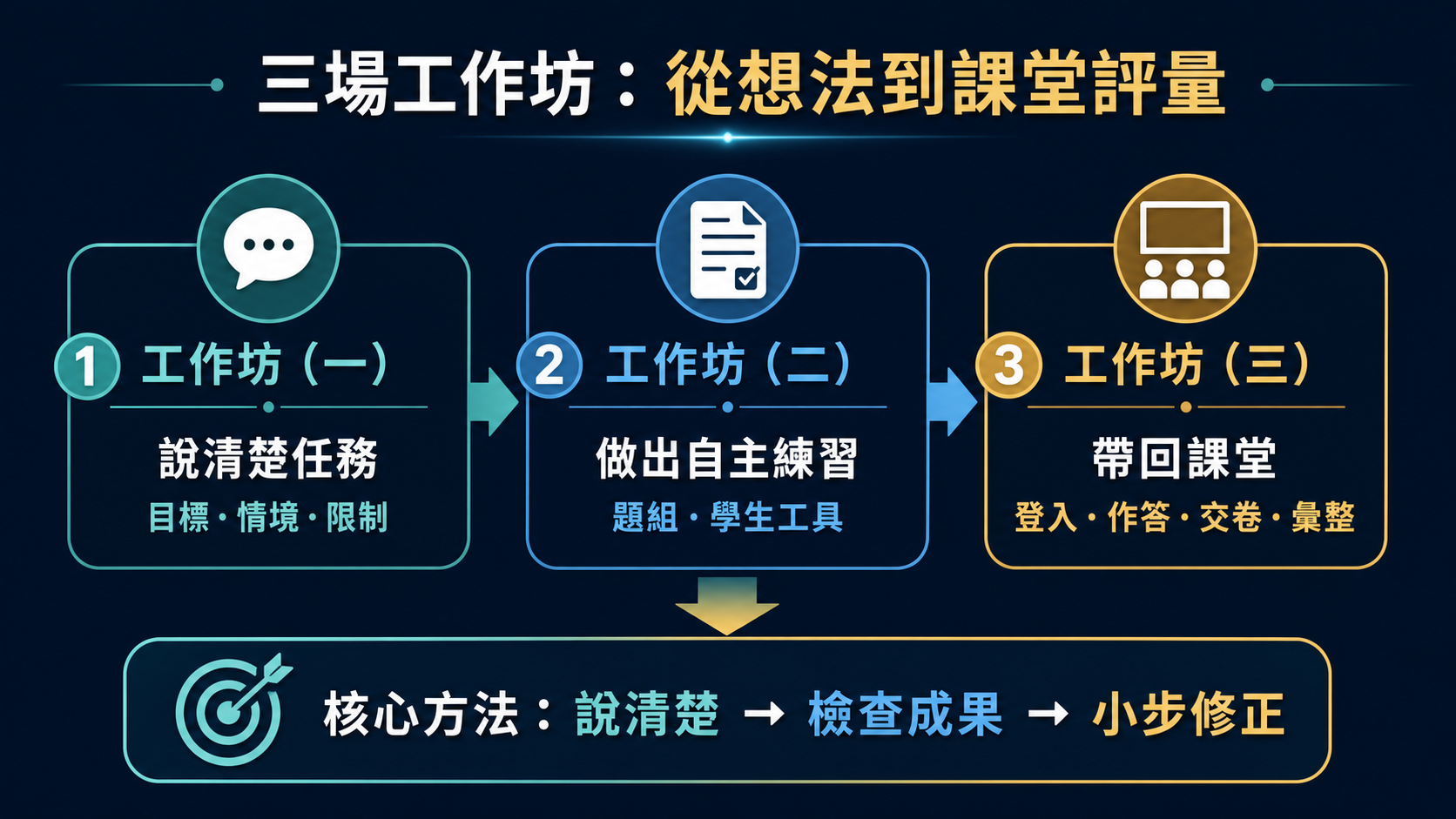
本場是「AI Agent 教學應用工作坊」系列三場中的第三場,也是最後一場,面向非工程背景的大學教師。系列以三場循序漸進的實作,協助教師理解 AI 已從單純的對話與提示詞工具,逐步發展為能協助處理電腦與雲端工作流程的 AI Agent;核心學習方法可遷移到不同 AI 工具:先說清楚目標、情境、限制與完成標準;再檢查成果、提出修正,並以小步迭代完成工作。
| 階段 | 工作坊 | 核心問題 | 當次成果 |
|---|---|---|---|
| 1. 學會與 AI 協作 | 工作坊(一) | 如何把模糊教學想法變成可檢查、可完成的任務? | AI 協作任務卡、一次教材或截圖分析與修訂紀錄 |
| 2. 做出自主練習小工具 | 工作坊(二) | 如何把自己的教材轉為題組與學生可使用的練習小工具? | 選擇題題組、靜態 HTML 自主練習小工具、測試紀錄 |
| 3. 延伸為課堂形成性評量 | 工作坊(三)〔本場〕 | 如何用最低必要功能,在課堂中快速掌握學生的概念理解? | 學生課堂作答原型、簡易教師 Dashboard、班級答題彙整與初步分析 |
本場承接工作坊(二)產出的題組與自主練習小工具,把課後自主練習帶回教室,做成學生登入課堂作答、教師收到交卷紀錄與分數的課堂形成性評量原型;工作坊(一)建立的「先說清楚、再檢查修正」協作方法,在這裡延伸到「登入、作答、交卷、批閱、彙整」這個更完整的教學情境。
二、工作坊簡介
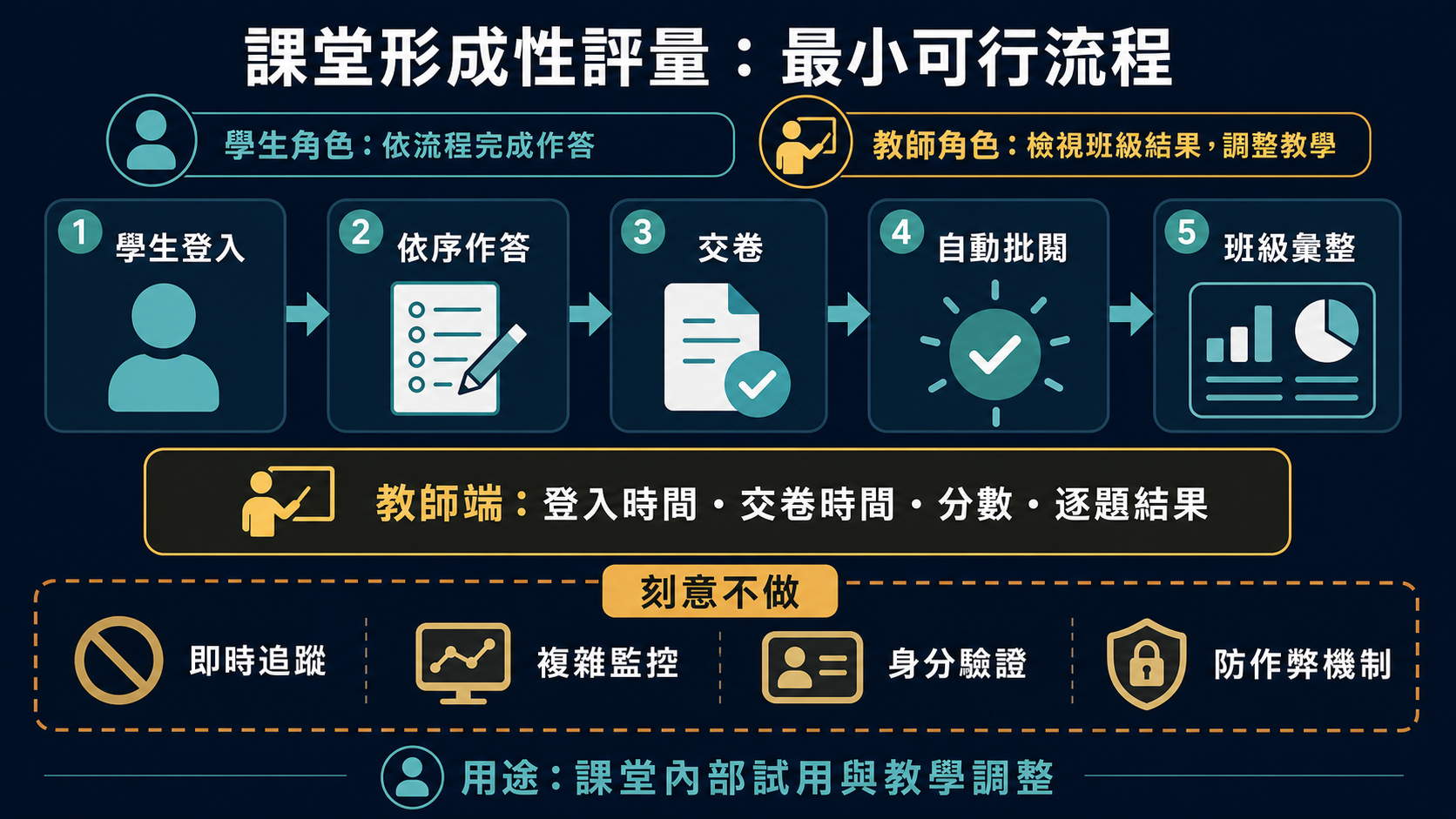
工作坊(二)做出的自主練習小工具適合學生課後自行練習,但沒有辦法保證學生作答時沒有藉助 AI 取巧作答,因此不適合直接拿來當作正式評量。本場工作坊要把同一套題組帶回教室:學生登入後,在課堂當下作答、交卷,系統就地自動批閱;教師端則收到每位學生的登入時間、交卷時間、分數與逐題作答結果。
教師端 Dashboard 刻意維持精簡:只在學生登入與交卷這兩個時間點顯示必要資訊,不做即時進度追蹤,也不做複雜的監控畫面,目的是讓學員能在一場工作坊的時間內,就與 AI Agent 協作完成一個可以實際運作的原型,而不是被即時監控這類更複雜的功能卡住。全班作答完成後,教師可以查看各題的整體答對率與常見錯誤,並把這份彙整結果交給 AI 協助整理成一份簡單的學習分析報告,作為下一次教學調整的參考。
這一場同樣練習從對話開始:與 AI Agent 協作,把「學生端要看到什麼、教師端要看到什麼、登入與交卷後各自要記錄什麼資料」這些需求用一般語言講清楚,讓 AI 決定用什麼方式做出來;做出來的成果如果不符合預期,也練習只用「看到的狀況」和「想要的結果」向 AI 追問修正,而不是自己動手改程式,也不是整段需求重講一次。
本場的目標同樣不是做出一套具備身分驗證與防作弊機制的正式線上測驗平台,而是完成一個可在課堂中實際試用的形成性評量原型。學員將親手體驗:把工作坊(一)練就的協作方法、工作坊(二)做出的題組與工具,延伸到「登入、課堂作答、交卷、批閱、彙整」這個更完整的教學情境,同時清楚知道這個刻意精簡的版本目前做得到什麼、做不到什麼。
三、適合參與者
- 已參與工作坊(一)(二),或已備妥一份選擇題題組(含題目、選項與答案)者。
- 想把課後自主練習帶回教室,讓學生在課堂中登入作答、當場交卷者。
- 想掌握學生的作答與交卷情況、初步成績,及早發現全班共同的迷思概念者。
- 能接受「先求可用、再談完整」,優先完成一個刻意精簡、僅供教室內部使用的最低必要功能版本,而非直接建置正式測驗平台者。
四、學習成果
完成本場後,您將能夠:
- 與 AI Agent 協作,把「學生登入課堂作答、教師收到交卷紀錄」這樣的需求講清楚,並在結果不如預期時,用簡短的追問請 AI 修正調整。
- 把工作坊(二)的選擇題題組轉為課堂作答版本,讓學生登入後依序作答、交卷並自動批閱。
- 建立一個刻意精簡的教師端 Dashboard,顯示學生登入時間、交卷時間、分數與逐題作答結果,並說明為什麼這裡選擇不做即時追蹤與複雜監控。
- 全班作答完成後,彙整各題答對率與常見錯誤,並與 AI 協作整理成簡單的學習分析報告,作為下一次教學調整的參考。
- 說明這個工具「能做什麼、不能做什麼」,並以驗收清單確認登入、作答、交卷、批閱與彙整的完整流程符合原先的教學需求。
五、工作坊重點與最小可行功能
工作坊重點:
- 比較課後自主練習與課堂形成性評量的差異。
- 將工作坊(二)題組轉為課堂作答版本。
- 設計登入作答與交卷後的基本資料流程。
- 建立教師端 Dashboard:交卷、時間、分數、逐題結果。
- 彙整全班答對率與常見錯誤,用 AI 產生學習分析。
最小可行功能(當次驗收基準):
- 學生可登入後在課堂中依序作答,交卷後系統自動批閱並立即顯示個人分數。
- 教師端可看到每位學生的登入時間、交卷時間、分數與逐題作答結果。
- 教師端 Dashboard 刻意不做即時進度追蹤與複雜監控,只在登入與交卷後顯示必要資訊。
- 全班作答完成後,教師可看到各題答對率與常見錯誤等班級層級統計。
- 班級層級統計可交給 AI,協助整理成一份簡單的學習分析報告。
- 題目、答案、學習目標對應仍須由教師檢核,題組資料與網頁程式保持清楚分工,方便日後更換教材或修改題目。
六、事前準備
- 請攜帶筆記型電腦,並確認電腦上已安裝可執行的 Python(可先在 Microsoft Store 搜尋「Python 3.12」安裝,並用
python --version確認有版本號)。 - 請攜帶工作坊(二)完成的題組資料(或至少一份可用的選擇題題組),作為本場串接測驗系統的素材;也可先使用講師提供的範例題庫。
- 請額外準備至少一台行動裝置(手機或平板皆可),用來模擬學生登入作答,與自己的教學筆電互相測試。
- 題目、答案與學習目標仍須由教師自行檢核;不使用學生個資、完整成績或其他機敏資料。
- 若曾參加工作坊(一)(二),請攜帶或整理當時完成的 AI 協作任務卡、題組與自主練習小工具。
若需要在現場前先複習工作坊(一)(二)的環境與設定基礎,可參考:
本場現場會與 AI Agent 協作,從零把「學生登入課堂作答」與「教師端 Dashboard」做出來,刻意先不做即時追蹤與複雜監控。
七、使用定位與範圍
本場產出定位為課堂教學用的輕量測驗工具,方便老師以同一份題庫進行隨堂小考或形成性評量,不是具備防作弊、身分驗證機制的正式線上測驗平台,不適合用於高風險、正式列入成績的測驗。
- 教師端 Dashboard 刻意精簡,不做即時進度追蹤與複雜監控,只在學生登入與交卷後顯示必要資訊;若需要更完整的即時監看功能,需在會後另行延伸開發。
- 作答頁與 Dashboard 目前都沒有帳號密碼保護:只要知道網址的人都能打開,甚至能打開教師端畫面;請只把學生作答網址交給學生,教師端網址自行留存,不要公開分享。
- 請勿把伺服器對外部網際網路開放(例如設定連接埠轉發、讓校外也能連進來),僅限教室內區網使用。
- 題目、答案、學習目標對應都必須由教師檢核,不可自動採用 AI 產出;不在 AI 對話中貼入學生個資或完整成績。
- 若題庫內容是有版權疑慮的考古題(例如技專校院入學測驗中心的試題),使用前請再次確認自己有合法使用與展示這些內容的權利。
- 若日後需要正式評量、跨班長期使用、個資處理、資料庫、權限、即時監考或雲端部署,應另行規劃資料治理、資安、無障礙、維運與校內程序。
八、預期帶走的成果
- 一份已轉換為課堂作答版本的選擇題題組。
- 一個學生登入即可在課堂中作答、交卷並自動批閱的原型。
- 一個刻意精簡、只在登入與交卷時顯示必要資訊的教師端 Dashboard。
- 一份彙整全班答對率與常見錯誤、由 AI 協助整理的學習分析報告。
- 一套「先講需求、再看結果追問修正」、可延續到其他教學工具的 AI Agent 協作方法。
九、系列總結與後續
「AI Agent 教學應用工作坊」三場到這裡告一段落:工作坊(一)練習把模糊的教學想法講清楚,與 AI Agent 協作完成可檢查的小任務;工作坊(二)把這個能力用在做出一份題組與學生可自主練習的小工具;工作坊(三)(本場)再把它帶回教室,做成學生登入課堂作答、教師收到交卷紀錄與分數的課堂形成性評量原型。三場的核心方法其實只有一件事:先說清楚目標、情境、限制與完成標準,再檢查成果、提出修正,並以小步迭代完成工作——這個方法不只用在做測驗工具,也可以遷移到日後想用 AI Agent 處理的任何教學或行政任務。
本場結束後沒有安排固定銜接的下一場工作坊。如果日後想把本場刻意精簡、不做即時追蹤的原型,延伸成能全班同時連線、老師即時看到作答進度的完整版本,可以延續本場的協作方法,持續與 AI Agent 對話、逐步擴充功能。請妥善保留本場產出的程式碼與題庫資料,歡迎持續依自己任教的科目與班級,延伸這一套流程。
AI Agent Teaching Applications Workshop (3): From Self-Practice to Classroom Formative Assessment
Smart Rainforest Industry Talent Development Program | This page is the handout for Workshop (3), compiled from planning documents; the official announcement for each cohort governs actual dates.
Course Information
| Item | Details |
|---|---|
| Sessions | Session 1: 08/25 (Tue) 13:00-17:30; Session 2: 08/31 (Mon) 13:00-17:30 (check-in starts at 12:30 for both) |
| Venue | Room J301, Building J, Southern Taiwan University of Science and Technology |
| Instructor | Prof. Rong-Lin Yang, Department of Electronic Engineering, STUST |
| Audience | College faculty who already have a multiple-choice question set (e.g. the output of Workshop (2)) and want to extend it into a classroom formative-assessment tool; no programming background required. |
This workshop runs two identical sessions — please register for one of them. Actual seat availability and the registration link follow the official announcement.
Agenda:
| Time | Content | Session Output / Checkpoint |
|---|---|---|
| 12:30-13:00 | Check-in | — |
| 13:00-13:10 | Opening and recap: review the question set and self-practice tool completed in Workshop (2), and outline how this session brings it back into the classroom. | A clear feature list |
| 13:10-14:00 | Assessment scenario and flow: compare after-class self-practice with classroom formative assessment, and collaborate with an AI Agent to clearly describe the "log in, answer in class, submit" flow. | A classroom answering flow design |
| 14:00-14:50 | Student-side login and submission: convert Workshop (2)'s question set into a classroom-answering version, and actually test login, answering in sequence, submission, and auto-grading. | A working student answering page |
| 14:50-15:20 | Tea break | — |
| 15:20-16:40 | Teacher dashboard: collaborate with an AI Agent to build a deliberately minimal teacher dashboard showing student login time, submission time, score, and per-question results. | A working teacher dashboard |
| 16:40-17:00 | Class-wide analysis: simulate the whole class finishing, aggregate per-question accuracy and common errors, and hand it to AI to help compile a simple learning-analysis report. | A class-level learning-analysis report |
| 17:00-17:30 | Classroom rehearsal and wrap-up: peers take turns as student and teacher to rehearse the full flow, and discuss how to bring this back to your own classroom. | A personalized adoption plan |
1. Series Positioning and Context
This is the third and final workshop of the "AI Agent Teaching Applications Workshop" series, designed for university faculty without an engineering background. Across three progressive, hands-on sessions, the series helps teachers see AI moving beyond a simple chat or prompting tool into an AI Agent that can help operate computer and cloud workflows. The core method transfers across tools: state the goal, context, constraints, and completion criteria clearly; check the results; then revise in small iterations.
| Stage | Workshop | Core Question | Session Output |
|---|---|---|---|
| 1. Learn to collaborate with AI | Workshop (1) | How do you turn a vague teaching idea into a checkable, completable task? | An AI collaboration task card and a traceable material/screenshot analysis and revision record |
| 2. Build a self-practice tool | Workshop (2) | How do you turn your own materials into a question set and a practice tool students can use? | A multiple-choice question set, a static HTML self-practice tool, and testing notes |
| 3. Extend to classroom formative assessment | Workshop (3) [this session] | How do you use the minimum necessary features to quickly gauge student understanding in class? | A classroom answering prototype, a simple teacher dashboard, and a class-wide summary with preliminary analysis |
This session builds on the question set and self-practice tool produced in Workshop (2), bringing after-class self-practice back into the classroom as a formative-assessment prototype where students log in to answer in class and the teacher receives submission records and scores. The collaboration method established in Workshop (1) — state things clearly, then check and revise — extends here to the fuller "log in, answer, submit, grade, aggregate" teaching scenario.
2. Workshop Overview
The self-practice tool built in Workshop (2) is well suited to after-class self-practice, but there's no way to guarantee students aren't leaning on AI to get the answers while answering, so it isn't suitable as a formal assessment on its own. This session brings that same question set back into the classroom: students log in and answer in class, right then and there, submitting for the system to auto-grade on the spot; the teacher side receives each student's login time, submission time, score, and per-question results.
The teacher dashboard deliberately stays minimal: it only shows necessary information at two points — login and submission — with no live progress tracking and no complex monitoring view. The point is to let participants finish a working prototype with an AI Agent within a single workshop session, rather than getting stuck on a more complex feature like real-time monitoring. Once the whole class has finished, the teacher can review overall per-question accuracy and common errors, and hand that summary to AI to help compile a simple learning-analysis report as a reference for the next lesson.
This session also starts from conversation: collaborate with an AI Agent to state, in plain language, what the student side should show, what the teacher side should show, and what data should be recorded at login and at submission, and let the AI decide how to build it. When the result doesn't match expectations, practice asking the AI to fix it using only "what I'm seeing" and "what I want instead" — not editing the code yourself, and not restating the whole requirement from scratch.
The goal of this session is likewise not to build a formal exam platform with identity verification and anti-cheating mechanisms, but to complete a formative-assessment prototype that can actually be tried out in the classroom. Participants will experience firsthand extending the collaboration method from Workshop (1) and the question set and tool from Workshop (2) into the fuller "log in, answer in class, submit, grade, aggregate" teaching scenario — while also being clear about what this deliberately minimal version can and can't do yet.
3. Who Should Attend
- Faculty who attended Workshops (1) and (2), or who already have a multiple-choice question set (questions, options, and answers) ready.
- Faculty who want to bring after-class self-practice into the classroom, so students can log in and answer, then submit on the spot.
- Faculty who want to see student answering and submission status and preliminary scores, catching common misconceptions early.
- Faculty comfortable with "usable first, complete later" — prioritizing a deliberately minimal, classroom-only minimum viable version over building a formal testing platform right away.
4. Learning Outcomes
After completing this session, you will be able to:
- Collaborate with an AI Agent to clearly state a requirement for "students log in to answer in class, the teacher receives submission records," and ask the AI for brief follow-up fixes when the result doesn't match expectations.
- Convert Workshop (2)'s multiple-choice question set into a classroom-answering version where students log in, answer in sequence, submit, and get auto-graded.
- Build a deliberately minimal teacher dashboard showing student login time, submission time, score, and per-question results, and explain why it deliberately skips live tracking and complex monitoring.
- Once the whole class has finished, aggregate per-question accuracy and common errors, and collaborate with AI to compile a simple learning-analysis report as a reference for the next lesson.
- Explain what this tool can and can't do, and use an acceptance checklist to confirm the full login → answer → submit → grade → aggregate flow meets the original teaching requirement.
5. Focus Points and Minimum Viable Features
Workshop focus points:
- Compare the differences between after-class self-practice and classroom formative assessment.
- Convert Workshop (2)'s question set into a classroom-answering version.
- Design the basic data flow for login, answering, and post-submission.
- Build a teacher dashboard: submission, timing, score, per-question results.
- Aggregate class-wide accuracy and common errors, and use AI to produce a learning analysis.
Minimum viable features (this session's acceptance baseline):
- Students can log in and answer in sequence during class; the system auto-grades on submission and immediately shows the individual score.
- The teacher side shows each student's login time, submission time, score, and per-question results.
- The teacher dashboard deliberately skips live progress tracking and complex monitoring, showing necessary information only at login and submission.
- Once the whole class has submitted, the teacher can see class-level statistics such as per-question accuracy and common errors.
- The class-level statistics can be handed to AI to help compile a simple learning-analysis report.
- Questions, answers, and the mapping to learning objectives must still be checked by the teacher; question-set data and the web page code stay cleanly separated, making it easy to swap in different materials or edit questions later.
6. Preparation Checklist
- Bring a laptop and confirm it has a working Python interpreter installed (if not, search the Microsoft Store for "Python 3.12" and confirm with
python --version). - Bring the question-set data completed in Workshop (2) (or at least one usable multiple-choice question set) as the source material for this session's exam server; you may also start from the sample question bank the instructor provides.
- Bring at least one extra mobile device (phone or tablet) to simulate a student logging in and answering, to test against your own teaching laptop.
- Questions, answers, and learning objectives must still be checked by the teacher; do not use student personal data, full grades, or other sensitive data.
- If you attended Workshops (1) and (2), bring or organize the AI collaboration task card, question set, and self-practice tool you completed then.
To review Workshops (1) and (2)'s environment and setup basics beforehand:
In the live session, you'll collaborate with an AI Agent to build "student login and classroom answering" and "the teacher dashboard" from scratch, deliberately skipping live tracking and complex monitoring for now.
7. Scope, Positioning, and Limitations
This session's output is positioned as a lightweight classroom testing tool, useful for pop quizzes or formative assessment with an existing question bank, not as a formal online testing platform with anti-cheating or identity-verification mechanisms, and not suited to high-stakes, grade-bearing tests.
- The teacher dashboard is deliberately minimal — no live progress tracking, no complex monitoring — showing necessary information only at login and submission. A fuller real-time monitoring version requires further development after the session.
- Neither the answering page nor the dashboard currently has password protection: anyone who knows the URL can open them, including the teacher's view. Only give students the answering URL; keep the teacher URL to yourself and don't share it publicly.
- Do not expose the server to the public internet (e.g. via port forwarding) — it's for classroom LAN use only.
- Questions, answers, and the mapping to learning objectives must all be checked by the teacher — AI output cannot be adopted automatically; do not paste student personal data or full grades into AI conversations.
- If the question bank contains copyright-sensitive past-exam material (e.g. from the Technological and Vocational Education Joint College Entrance Examination Center), confirm you have the legal right to use and display it before running this tool.
- If formal assessment, long-term cross-class use, personal-data handling, databases, permissions, live monitoring, or cloud deployment are needed later, plan data governance, security, accessibility, operations, and institutional procedures separately.
8. Expected Takeaways
- A multiple-choice question set converted into a classroom-answering version.
- A prototype where students log in to answer in class, submit, and get auto-graded.
- A deliberately minimal teacher dashboard that shows necessary information only at login and submission.
- A class-wide learning-analysis report, aggregating per-question accuracy and common errors with AI's help.
- An AI Agent collaboration method — state the requirement, then check and follow up — you can reuse for other teaching tools.
9. Series Wrap-up and Next Steps
The three-workshop "AI Agent Teaching Applications Workshop" series concludes here: Workshop (1) practiced stating a vague teaching idea clearly and collaborating with an AI Agent on small, checkable tasks; Workshop (2) turned that skill into a question set and a self-practice tool students can use; Workshop (3) (this session) brought it back into the classroom as a formative-assessment prototype where students log in to answer in class and the teacher receives submission records and scores. The core method across all three is really just one thing: state the goal, context, constraints, and completion criteria clearly; check the results; revise; and iterate in small steps — a method that transfers not just to building testing tools, but to any teaching or administrative task you want to hand to an AI Agent later.
There is no further workshop scheduled to follow this session. If you later want to upgrade this session's deliberately minimal, non-live prototype into a full version where the whole class connects at once and the teacher sees progress live, you can continue this session's collaboration method — keep talking with an AI Agent and extend the features step by step. Please keep the code and question-bank data you produce today, and feel free to keep extending this workflow for your own subjects and classes.