AI Agent 教學應用工作坊 (一)

課程資訊

活動日期及時間:

場次 日期 時間
單一場次 115 年 8 月 3 日(一) 13:00 - 17:30

活動議程:

時間 內容 主講人
12:30 - 13:00 報到
13:00 - 13:10 開場 余兆棠 教務長
13:10 - 14:00 AI Agent 工作環境建置 楊榮林 教授
14:00 - 14:50 AI 工具認識 楊榮林 教授
14:50 - 15:20 茶敘休息(下午茶)
15:20 - 16:40 AI 工具實務操作 楊榮林 教授
16:40 - 17:30 實作成品展示與交流 楊榮林 教授
17:30 ~ 賦歸
0803 前測

課程大綱

這場工作坊的核心目標,是讓教師理解 AI Agent 如何成為教學與行政工作的實作夥伴。AI Agent 不只是回答問題的聊天工具;它可以在授權範圍內讀取專案檔案、修改內容、執行命令、操作瀏覽器,並把完成任務的過程整理成可以重複使用的流程。

教師不需要先成為程式設計師,才有資格使用這類工具。更重要的是,教師要能用清楚的自然語言描述目標、提供材料、判斷成果是否正確,並把成功經驗逐步固定成講義、Skill、腳本或工作流程。這種能力會降低把教學構想落地的成本,也會讓原本需要大量手動處理的工作變得更容易試作與調整。

本課程的學習重點包括形成性評量、個別化回饋、資料整理、網頁擷取、教材生成、本機專案管理,以及 AI Agent 的安全使用。學員完成課程後,應能判斷哪些任務適合交給聊天式 AI,哪些任務適合交給 AI Agent,哪些資料則應留在本機或先做去識別化處理。

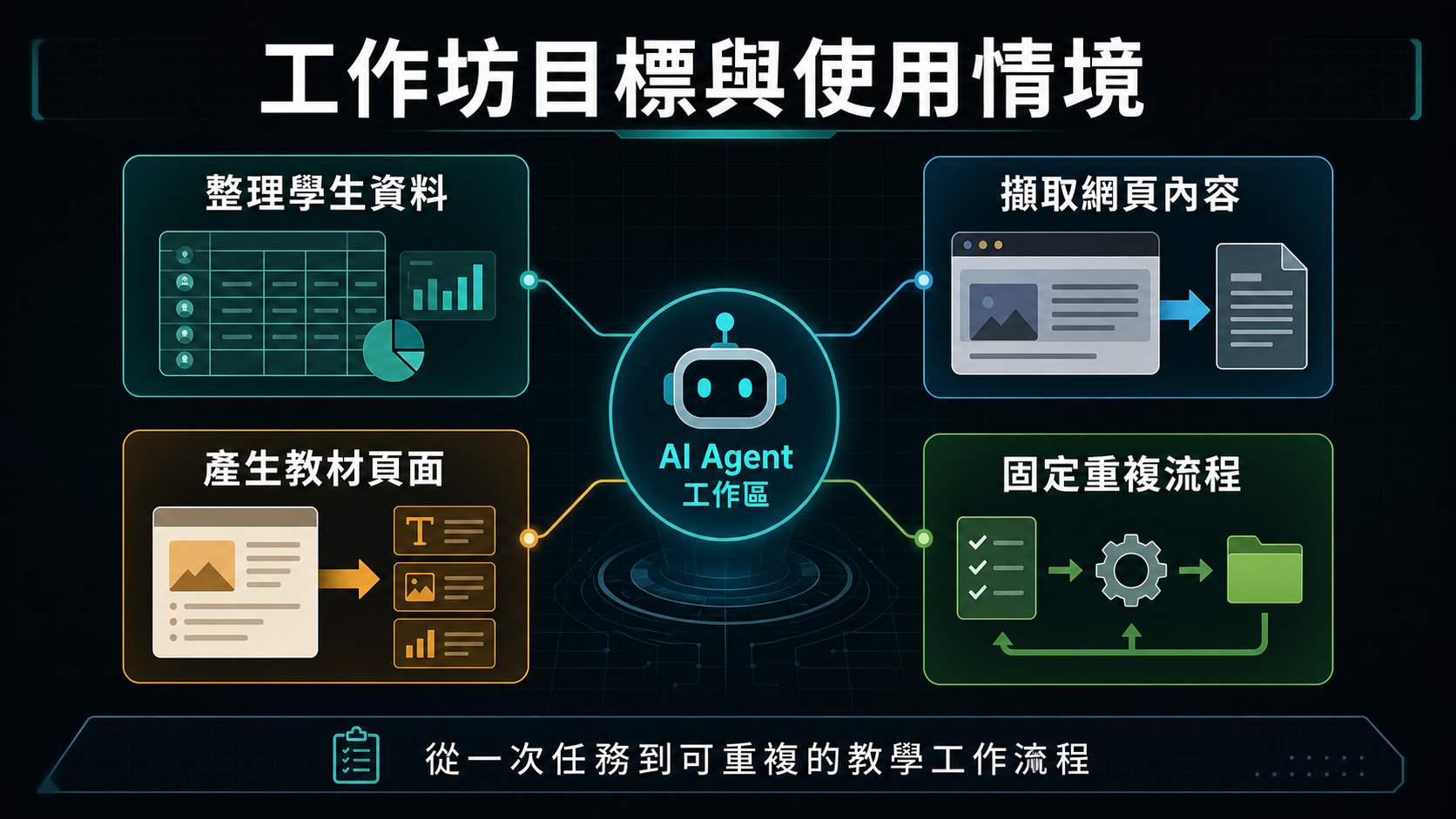
工作坊目標與使用情境資訊圖

一、工作坊目標與使用情境

本工作坊希望每位教師最後都能帶走一個與自己工作有關的小工具或可重複流程。這個成果不必是完整系統,也不必包含大量程式碼;它可以是整理學生資料的流程、擷取網頁內容的方法、產生教材頁面的模板、建立互動練習的步驟,或把重複行政工作包裝成可再次執行的 Skill。

每位教師的使用情境都不同。不同課程、學校、學生族群與行政需求,會產生不同痛點。因此,課程的目的不是提供單一標準答案,而是讓學員理解 AI Agent 的能力邊界。只要某項工作原本可以透過鍵盤、滑鼠、瀏覽器、檔案與簡單工具完成,就有機會讓 AI Agent 協助規劃、執行與整理。

課程使用 Codex 作為核心工具,並搭配 VS Code、GitHub、GitHub Copilot、Playwright MCP 與 Ollama。這些工具各自扮演不同角色:Codex 負責專案中的代理工作,VS Code 協助查看檔案,GitHub 支援版本管理與分享,Playwright MCP 支援瀏覽器操作,Ollama 提供 Local LLM 的本機模型情境。學習重點不在背工具名稱,而在理解它們如何組成一條可工作的流程。
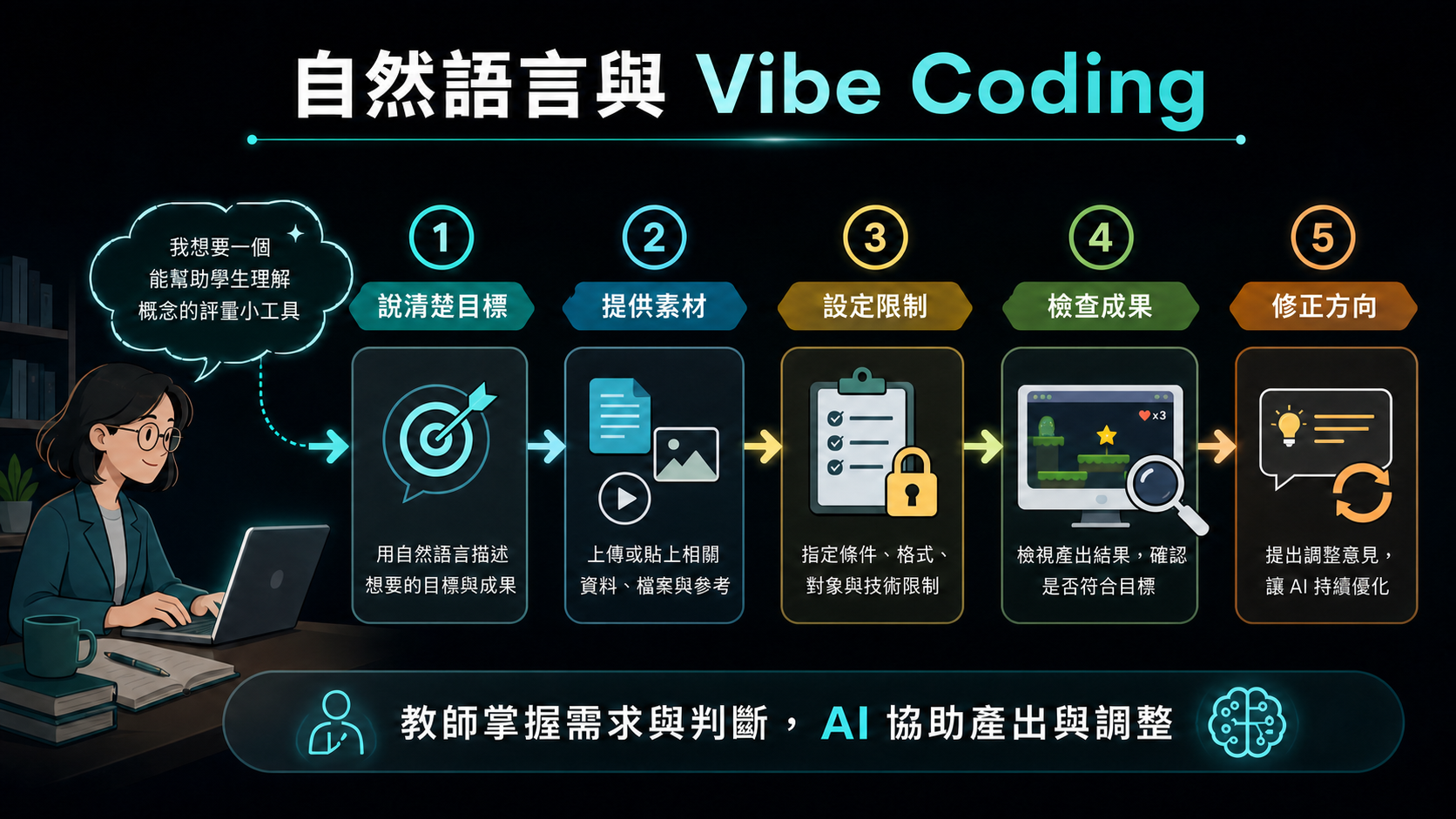
自然語言與 Vibe Coding 資訊圖

三、自然語言、vibe coding 與程式角色的改變

人與電腦互動的方式正在改變。過去主要靠鍵盤、滑鼠、命令列與圖形介面操作;現在,自然語言也逐漸成為一種操作電腦的介面。使用者可以用日常語言描述目標、限制、資料來源與輸出格式,再由 AI 協助產生、執行或修改具體成果。

Vibe coding 的重點不只是 coding,而是把「想要什麼」說清楚。使用者提供目標、素材與回饋,AI 協助產生程式、網頁、教材、自動化流程或資料整理結果。教師真正需要掌握的是需求描述、結果檢查、資料補充與方向修正,而不是每一行程式的語法細節。

這並不表示程式知識不再重要。當成果要公開部署、處理敏感資料、連接外部系統或長期維護時,仍需要檢查安全性、正確性與可維護性。不過,對許多教學與行政原型而言,AI 已經能讓非程式背景的教師更快做出可試用的版本。

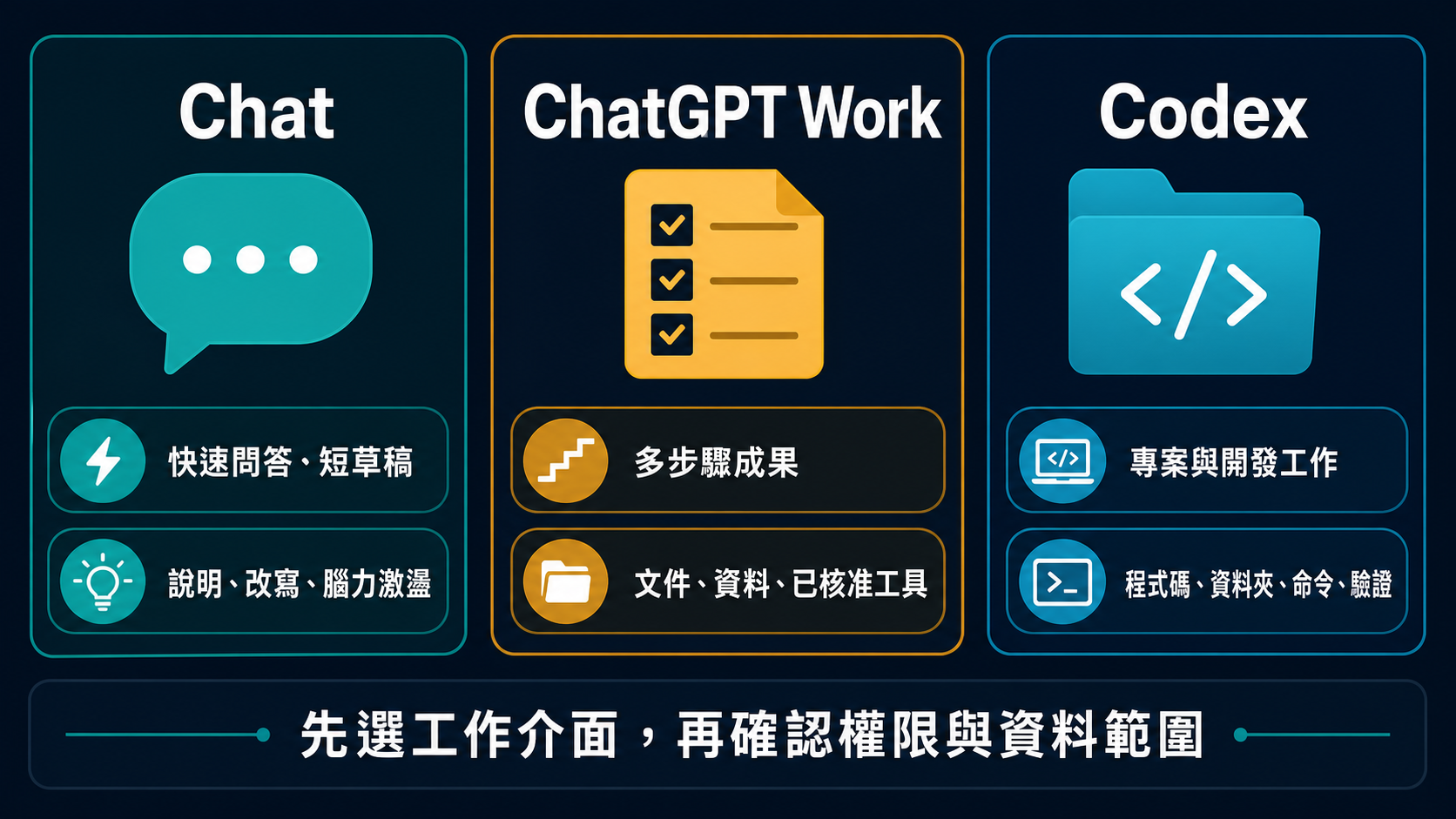
ChatGPT 的 Chat、ChatGPT Work 與 Codex 三種工作介面選擇圖

四、ChatGPT:Chat、Work 與 Codex

現在可先把 ChatGPT 想成一個入口,再依任務選擇工作介面。Chat 適合快速問答、釐清概念、改寫短文與腦力激盪;ChatGPT Work 適合有明確成果的多步驟任務,例如彙整資料、製作簡報、產生可檢閱的文件或定期更新;Codex 則用在需要程式碼庫、專案資料夾、命令列與開發工具的工作。

要完成的事建議選擇課堂中的例子
快速說明、提問或短草稿Chat討論資料分析方向、改寫教學說明。
需要多個步驟、檔案或已核准工具的完整成果ChatGPT Work把會議資料整理成可檢閱的簡報或報告。
需要讀寫專案、執行腳本或驗證程式Codex分析 workbook、產生 HTML、啟動本機伺服器並測試網頁。

三種介面不是能力高低的對立,也不是「ChatGPT 只能文字、Codex 才能做檔案」的二分法。ChatGPT Work 也能在可用且已核准的情況下使用檔案與工具;本課程選 Codex,是因為後續練習需要清楚的本機工作區、可重複的腳本與可驗證的輸出。

只要任務會接觸檔案、工具或外部服務,就要確認可讀寫範圍、網路與工具權限,以及哪些動作需要批准。能力越多,越需要清楚邊界與人工監督。

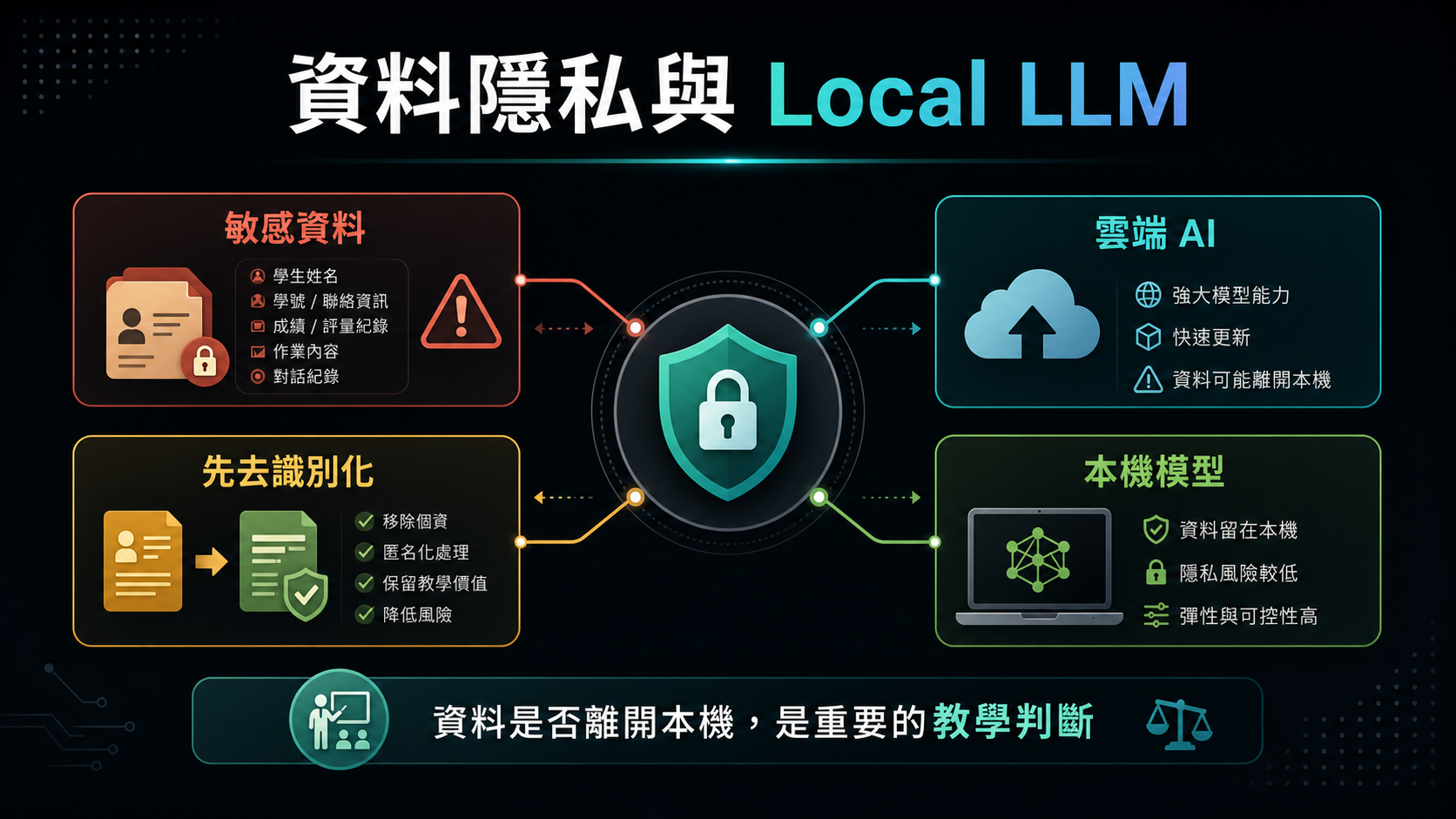
資料隱私與 Local LLM 資訊圖

五、資料隱私、雲端 AI 與 Local LLM

教師經常接觸學生資料、成績資料、行政資料與學校內部文件。這些資料不應在沒有處理的情況下直接上傳雲端 AI。即使服務提供者宣稱資料不會被拿去訓練模型,資料離開本機後仍會涉及外部儲存、傳輸與資安風險。

處理敏感資料前,應先做去識別化。例如將學生姓名、學號、班級、座號與其他可識別資訊替換成代碼,只保留分析所需欄位。若資料非常敏感,或學校政策不允許上傳外部服務,就應考慮使用 Local LLM。

Local LLM 是在本機執行的語言模型,例如透過 Ollama 下載並執行 gemma3:12b 之類的模型。它的優點是資料留在本機,不必上傳雲端;缺點是需要較多硬體資源,速度與能力也可能不如大型雲端模型。實務選擇可以分成三類:一般問答使用聊天 AI,需要操作檔案與工具時使用 AI Agent,敏感資料或離線需求則考慮 Local LLM。

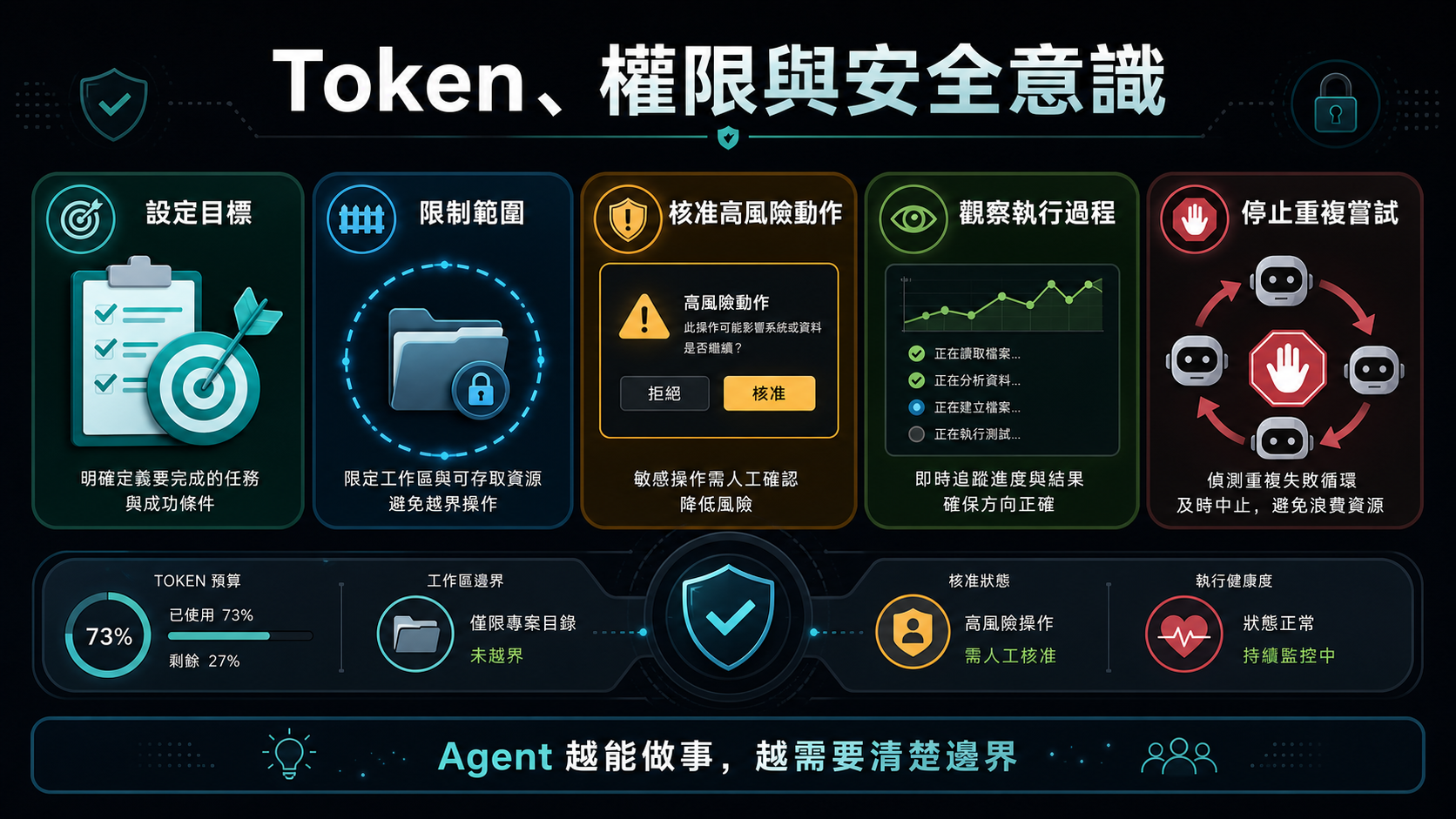
Token 權限與安全意識資訊圖

六、Token、權限與安全意識

Token 可以理解為 AI 系統處理文字與上下文的單位。越長的對話、越多檔案、越複雜的任務,都會消耗更多 token。AI Agent 若在錯誤方向上反覆嘗試,可能快速消耗額度。因此,使用 Agent 時應設定清楚目標、限制範圍,並在必要時要求它先提出計畫或回報進度。

權限管理是 AI Agent 使用中的核心能力。使用者應避免一開始就開放完整電腦存取權。較安全的做法是把工作限制在特定 project 或 workspace 中,讓 Agent 只能讀取與修改該資料夾下的內容。若任務需要超出範圍,例如下載外部資源、開啟其他資料夾或執行高風險命令,系統應要求使用者批准。

剛開始使用時,不建議讓 Agent 無人看管地長時間執行。教師應觀察它準備做什麼、執行了什麼、是否開始重複嘗試、是否需要額外權限,以及輸出是否符合預期。這樣可以同時控制 token 成本、資料安全與檔案安全。

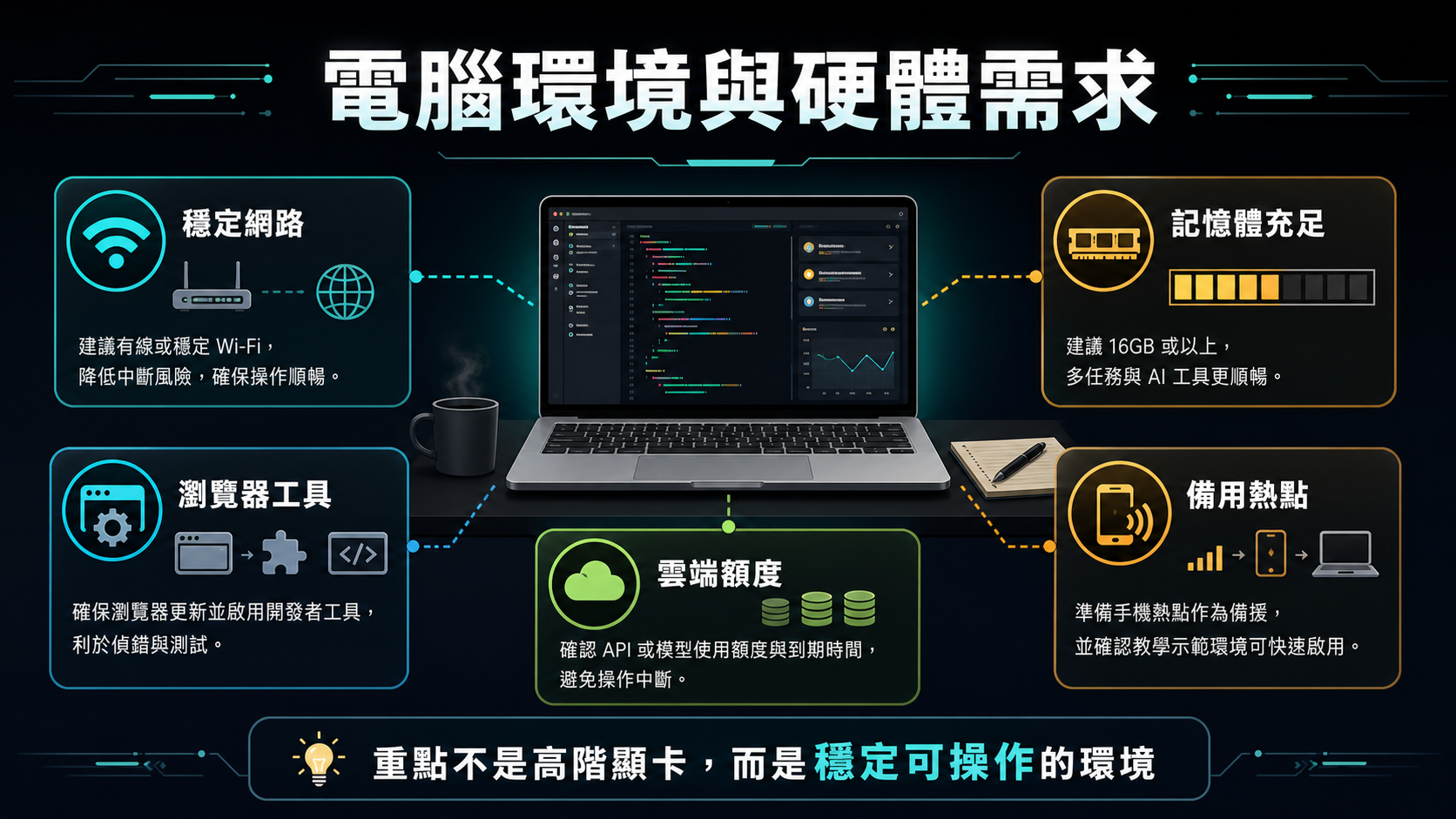
電腦環境與硬體需求資訊圖

七、電腦環境與硬體需求

本課程主要使用雲端模型,因此模型推論不需要在學員電腦上完成。一般三到五年內的 Windows 筆電或 Mac,通常足以進行課程練習。真正需要注意的是網路穩定性、雲端模型額度、token 消耗,以及同時開啟多個應用程式時的記憶體使用量。

AI Agent 的工作方式通常不是只開一個聊天視窗。實作時可能會同時開啟 Codex、瀏覽器、終端機、VS Code、本機伺服器與專案資料夾。若記憶體太小,整體操作會變慢,瀏覽器與開發工具也可能卡頓。因此,雖然不需要高階顯示卡,仍建議使用記憶體較充足的電腦。

課程現場常見的問題是網路限制與下載速度。ChatGPT 桌面版、Codex CLI、套件、瀏覽器工具或範例資料若下載很慢,可能不是工具本身故障,而是學校網路、共享頻寬或安全政策造成的限制。正式上課前,應盡量先完成安裝、登入與資料下載。

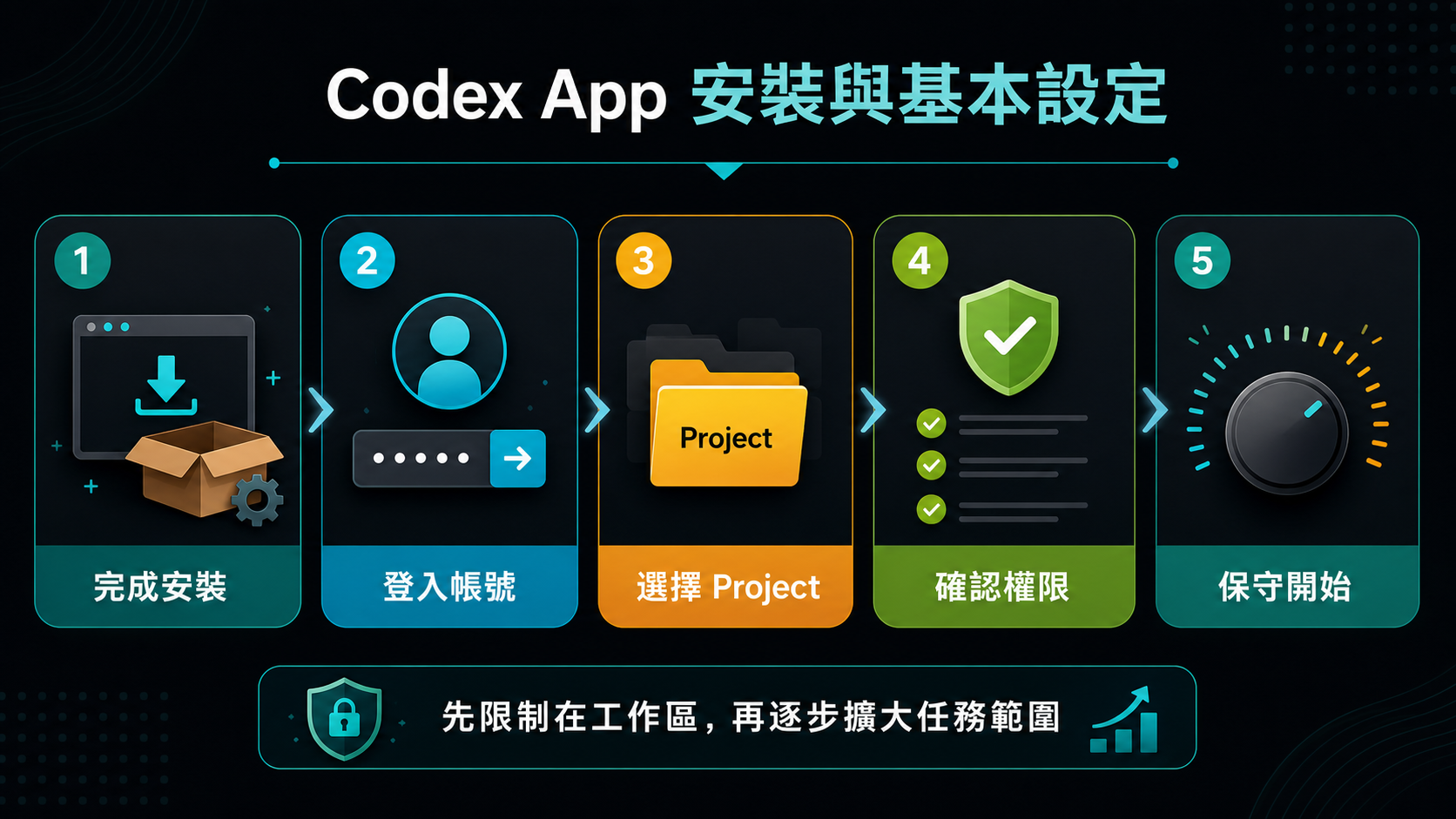
Codex App 安裝與基本設定資訊圖

八、在 ChatGPT 中使用 Codex:工作區與基本設定

開始前先開啟 ChatGPT 並登入可用帳號;再從工作介面選擇 Codex,讓它處理需要專案資料夾、程式碼或開發工具的任務。實際可用功能會依帳號方案、工作區設定與產品推出狀況而異,因此以登入後可看到的選項為準。

第一次設定 Codex 時,應先選擇一個明確的 project 或 workspace。Codex 看起來像聊天工具,但它會綁定特定資料夾;這表示它能在指定範圍內讀取檔案、修改檔案與執行工具。開始任務前,應確認目前開啟的是哪個專案、可讀寫範圍在哪裡,以及執行命令時是否需要批准。

基本設定應以安全與可理解為優先。若使用者不是程式背景,可以選擇較白話的回應方式,讓 Codex 用一般語言說明它正在做什麼。檔案權限建議先限制在工作區內,並在需要下載外部資源、開啟其他資料夾或執行較高風險命令時要求批准。這樣可以保留使用者的控制權,也能避免 Agent 無意間碰到不相關檔案。

不建議初學者一開始就開啟完整存取權。完整存取權可能讓 Codex 接觸更大範圍的檔案、下載工具或執行高風險操作。較好的學習方式是先用小型練習專案建立信任與理解,再逐步擴大任務範圍。

設定細節可參考外部講義:ChatGPT(Codex)工作區與權限設定。這份講義整理工作區、權限、沙盒、網路存取與保守設定檢查,適合在 Workshop 1 開始前或 Module 1 操作前先閱讀。

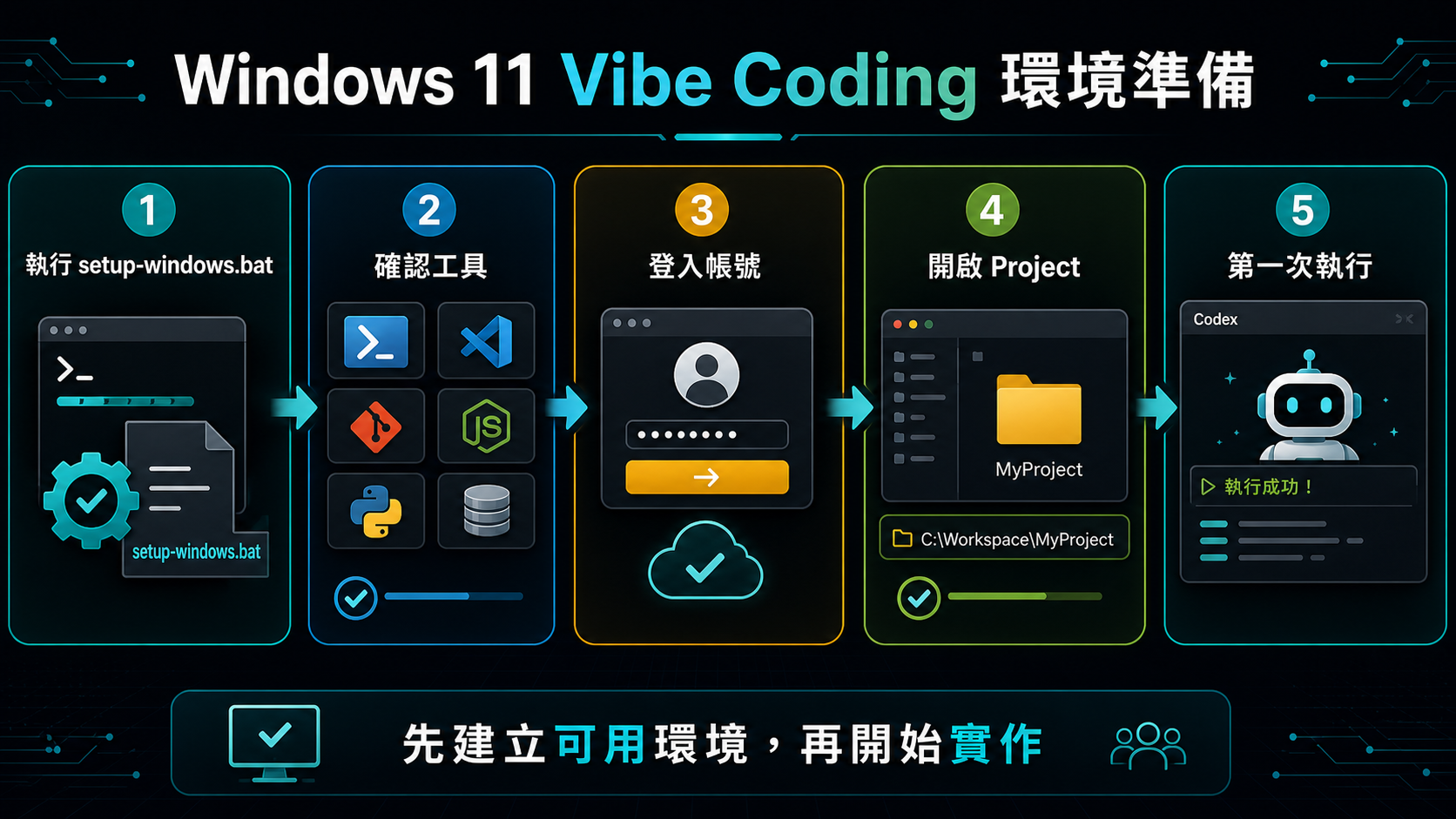
Windows 11 Vibe Coding 環境準備資訊圖

九、Module 1:Windows 11 Vibe Coding 環境準備

本節以 Windows 11 筆電為主,目標是先完成可用的 Vibe Coding 工作環境,而不是立刻精通所有工具。學員需取得課程資料、確認資料夾位置,並能在 Codex 中開啟正確的 project。

補充講義提供三種安裝方式,可依權限、網路與個人偏好擇一:手動安裝逐項下載並執行 winget 指令;透過 AI Agent Prompt 安裝,於 ChatGPT 桌面 app 切換到 Work 並開啟完整存取權(Full access)後貼上課程提供的 prompt,讓 AI Agent 自行檢查缺少的工具、依序安裝並回報結果(安裝完成後務必切回先要求核准);或使用課程提供的 setup-windows.bat 一鍵安裝。三種方式安裝的工具清單相同,若其中一種失敗,可改用另一種或回頭手動排除。完成後,確認 code、git、node、npm、uv、gh 與 codex 都能顯示版本號。

帳號部分需確認 ChatGPT / Codex 與 GitHub 都能登入。Codex CLI 透過瀏覽器登入 ChatGPT 帳號;GitHub CLI 使用 gh auth login 與一次性代碼登入,不需要先設定 SSH 金鑰。

完成本節後,學員應能啟動 Codex CLI、讓 Codex 讀取第一個 project,並具備 VS Code、Python、Node.js 與 GitHub CLI 的基本可用環境。

補充材料:Windows 11 Vibe Coding 與 AI Agent 環境建置

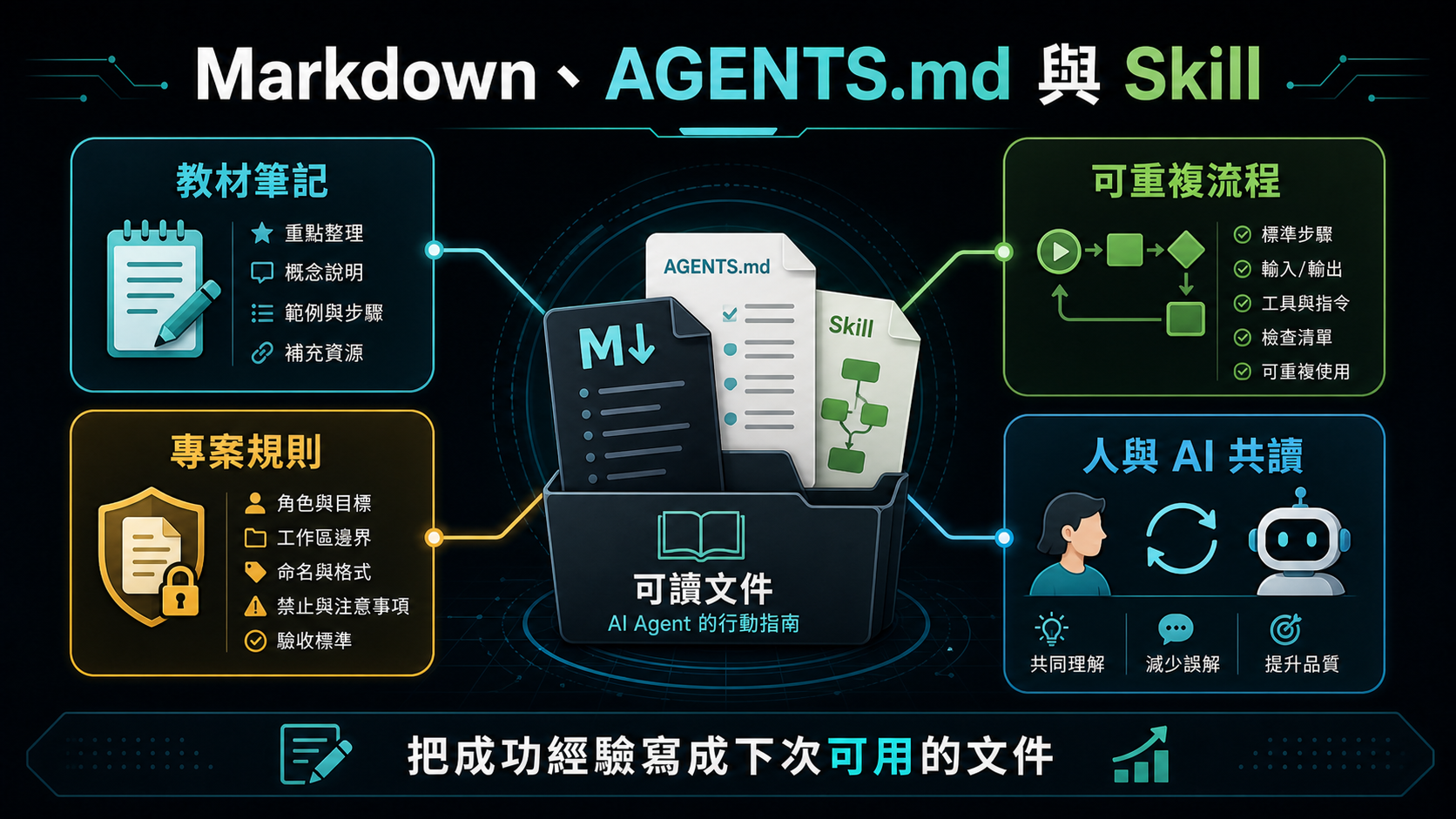
Markdown AGENTS.md 與 Skill 資訊圖

十、Markdown、AGENTS.md、Skill 與可讀文件

Markdown 是 AI 工作流程中非常重要的文件格式。它是純文字檔,但能用標題、段落、清單、表格、程式區塊與連結整理內容。對人而言,Markdown 容易閱讀;對 AI 而言,Markdown 結構清楚,適合當作教材、規則、任務說明或操作手冊。

AGENTS.md 可用來描述專案中的工作規則。例如專案如何啟動、檔案放在哪裡、測試如何執行、產出格式有什麼限制、哪些資料不能修改。這類文件會影響 AI Agent 的工作方式,讓它不必每次都重新猜測專案慣例。

Skill 是把可重複流程固定下來的方式。當某項任務未來會一再發生,例如整理課程名冊、產生固定格式講義、擷取特定網站資料或建立同類型報表,就適合把流程寫成 Skill。Skill 的價值在於把一次試成功的經驗,轉換成下次可以穩定呼叫的能力。

延伸練習可參考:AGENTS.md 入門講義:給 Codex 的簡單專案規則。這份材料聚焦最簡單的 Codex project,提供一份短版 AGENTS.md 範本,並包含三個入門範例,適合課堂中讓學員直接改成自己的專案版本。

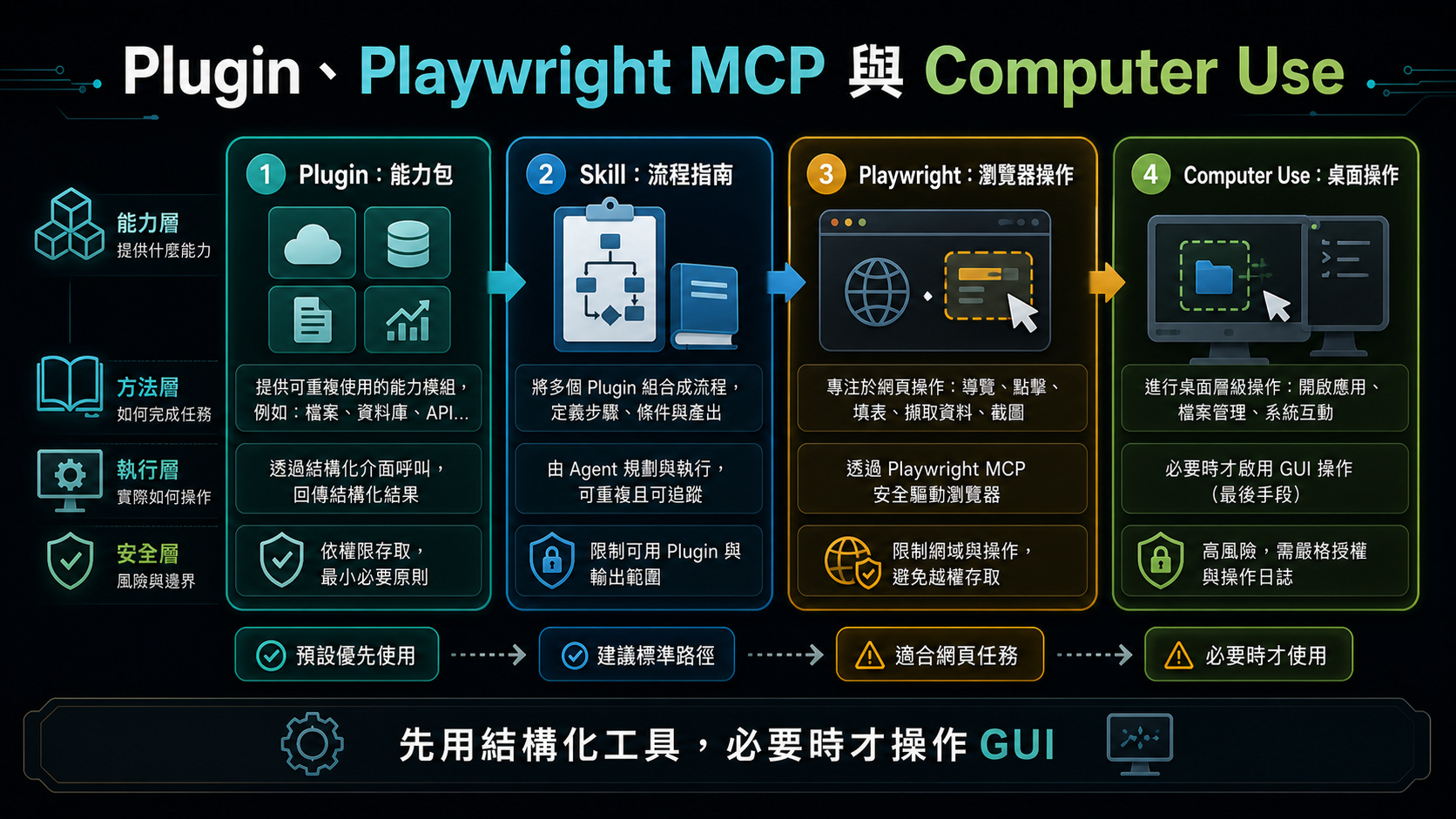
Plugin Playwright MCP 與 Computer Use 資訊圖

十一、Plugin、Playwright MCP 與 Computer Use

在 Codex 的能力架構中,Plugin 與 Skill 是不同層級的概念。Plugin 比較像「能力包」或「工具整合包」:安裝後可能提供新的工具、apps、MCP servers、瀏覽器控制、桌面操作或其他系統能力。Computer Use、Record & Replay 這類能力可以理解為 Plugin 層級的功能,它們讓 Codex 能接觸原本不能直接操作的環境,例如桌面視窗、使用者操作紀錄或外部服務。

Skill 則比較像「任務說明書」或「可重複工作流程」。它不一定提供新的底層工具,而是告訴 Codex 遇到某類任務時應該怎麼判斷、讀哪些材料、用哪些工具、照什麼步驟完成,以及最後如何驗證。例如 Image Gen skill 會引導 Codex 在需要圖片產生或圖片編修時使用合適的圖片工具;Playwright CLI skill 會引導 Codex 用命令列方式操作瀏覽器、截圖、測試或除錯網頁流程。

可以用一句話區分:Plugin 提供「Codex 能用什麼能力」,Skill 提供「Codex 遇到某類任務時該怎麼做」。有些 Plugin 會附帶 Skill,讓新工具不只是被安裝,也有對應的使用流程;但兩者仍不是同一件事。Plugin 偏向能力與連接,Skill 偏向流程與方法。

Playwright MCP 是結構化瀏覽器控制能力,讓 AI Agent 能開啟網頁、點擊按鈕、填寫表單、等待 JavaScript 渲染、截圖與擷取資料。這比單純讀取 HTML 更接近真實使用者的操作方式,也適合處理需要登入、按鈕互動或動態載入資料的頁面。若同時有 Playwright 相關 Skill,Skill 會進一步規範何時使用 Playwright、如何記錄截圖、如何驗證頁面是否真的完成操作。

Computer Use 是更一般化的 GUI 操作能力,可以操作桌面視窗、點擊應用程式與輸入文字。它很強,但也更難控管,因此應視為最後手段。若任務有 API、CLI、MCP 或其他結構化工具可用,應優先使用那些較可檢查、較穩定的方式;只有在必須操作圖形介面時,才考慮使用 Computer Use。Record & Replay 也屬於偏工具能力的概念:它先記錄一次操作,再讓 AI Agent 之後依照相同意圖重做,適合重複性高、風險可控的任務。

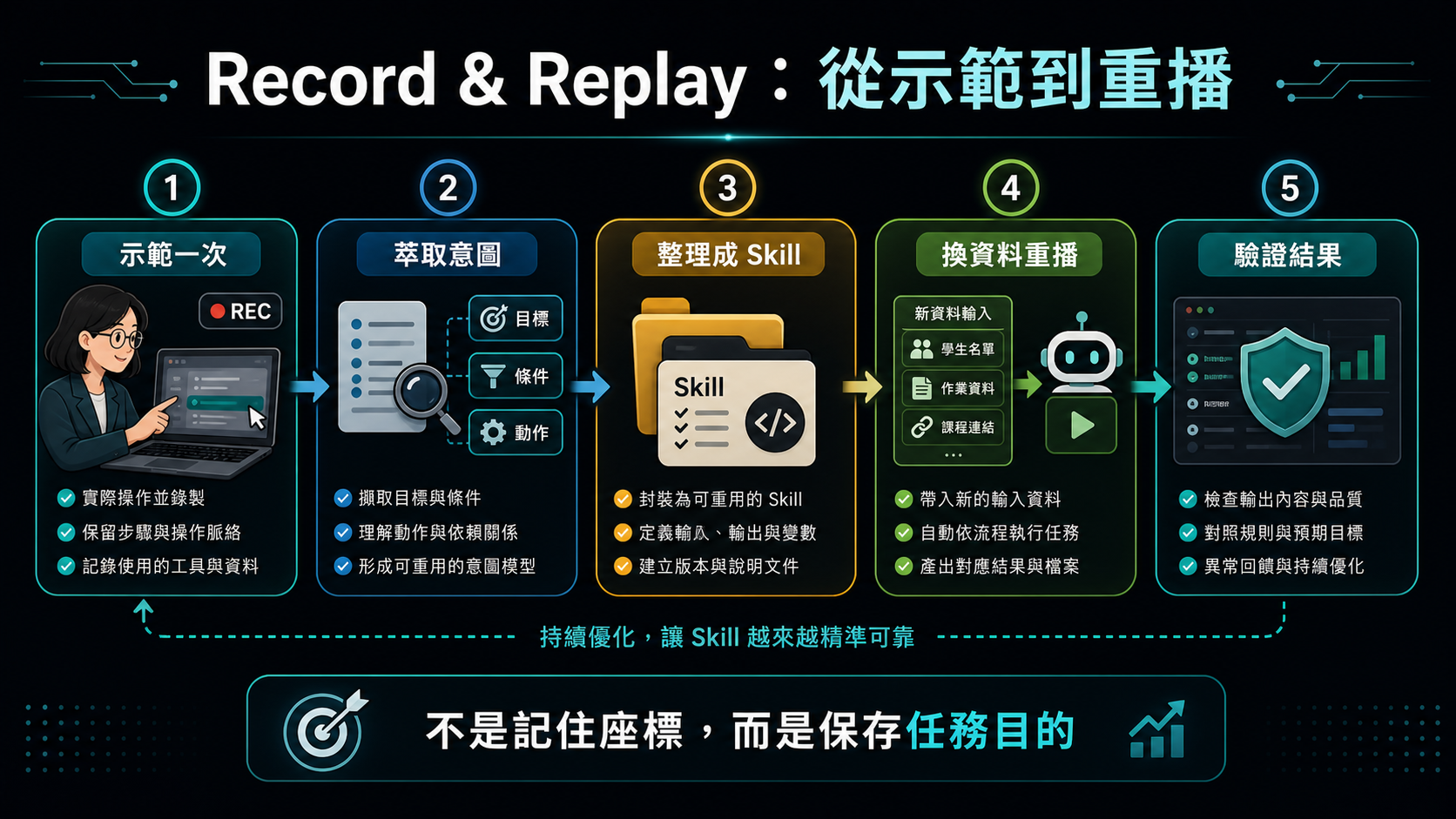
Record and Replay 工作流程資訊圖

十二、Record & Replay:從示範到意圖式重播

Record & Replay 的概念是先記錄一次使用者操作,再讓 AI Agent 之後依照相同意圖重做。它不是單純記住滑鼠座標,而是嘗試理解任務目標,例如開啟某頁、選擇某項、下載某份資料、建立報表或完成某個行政流程。

Record 是示範與萃取流程:使用者先做一次,讓 Codex 觀察任務目標、重要欄位、輸入輸出、判斷點與完成條件,並整理成可重複使用的 skill。Replay 則是依照這份 skill 重新完成任務;下一次使用者提供新的日期、檔案或查詢條件時,Codex 不是逐格播放錄影,而是依照同一個任務意圖重新操作。

這與傳統 macro 不同。傳統巨集通常記住固定的點擊位置與按鍵順序,畫面一變、按鈕位置改變或資料筆數不同,就可能失效。Record & Replay 比較接近「把示範轉成任務知識」:它保留流程目的與檢查方法,因此在檔名、位置或畫面略有不同時,有機會調整策略。不過如果流程大改、權限不足或成功條件沒有定義,重播仍可能失敗。

它也不等於傳統 web scraping。Web scraping 通常針對 HTML、API 回應或 DOM 結構擷取資料,適合大量、規則、可重複的公開資料處理;Record & Replay 則較適合「人本來會在 GUI 中操作」的流程,例如登入後台、選日期、匯出報表、重新命名檔案並檢查輸出。能用 API、CSV 下載或結構化資料來源時,應優先使用那些方式;需要操作畫面時,才考慮 Playwright、Computer Use 或 Record & Replay。

這類功能適合用在重複性高、步驟清楚、風險可控的任務。不要把它當成繞過網站限制、驗證碼、付費牆或服務條款的工具;若流程涉及帳號登入、學生資料、行政資料或高權限操作,仍應保持人工監督。好的重播流程應有明確輸入、輸出、停止條件與驗證方式。

截至 2026-07-31 重新查核 OpenAI 官方文件,結論不變:Record & Replay 仍標示為僅可在 macOS 使用,且需要 Computer Use 可用並已啟用;初始可用地區不包含 EEA、英國與瑞士,官方頁面仍未列出 Windows 或 Linux 版本可用。舊版查核連結 developers.openai.com/codex/record-and-replay 已永久轉址;課程材料應改用現行文件位址。日後若官方文件更新,這一段應重新查核。查核來源:https://learn.chatgpt.com/docs/extend/record-and-replay

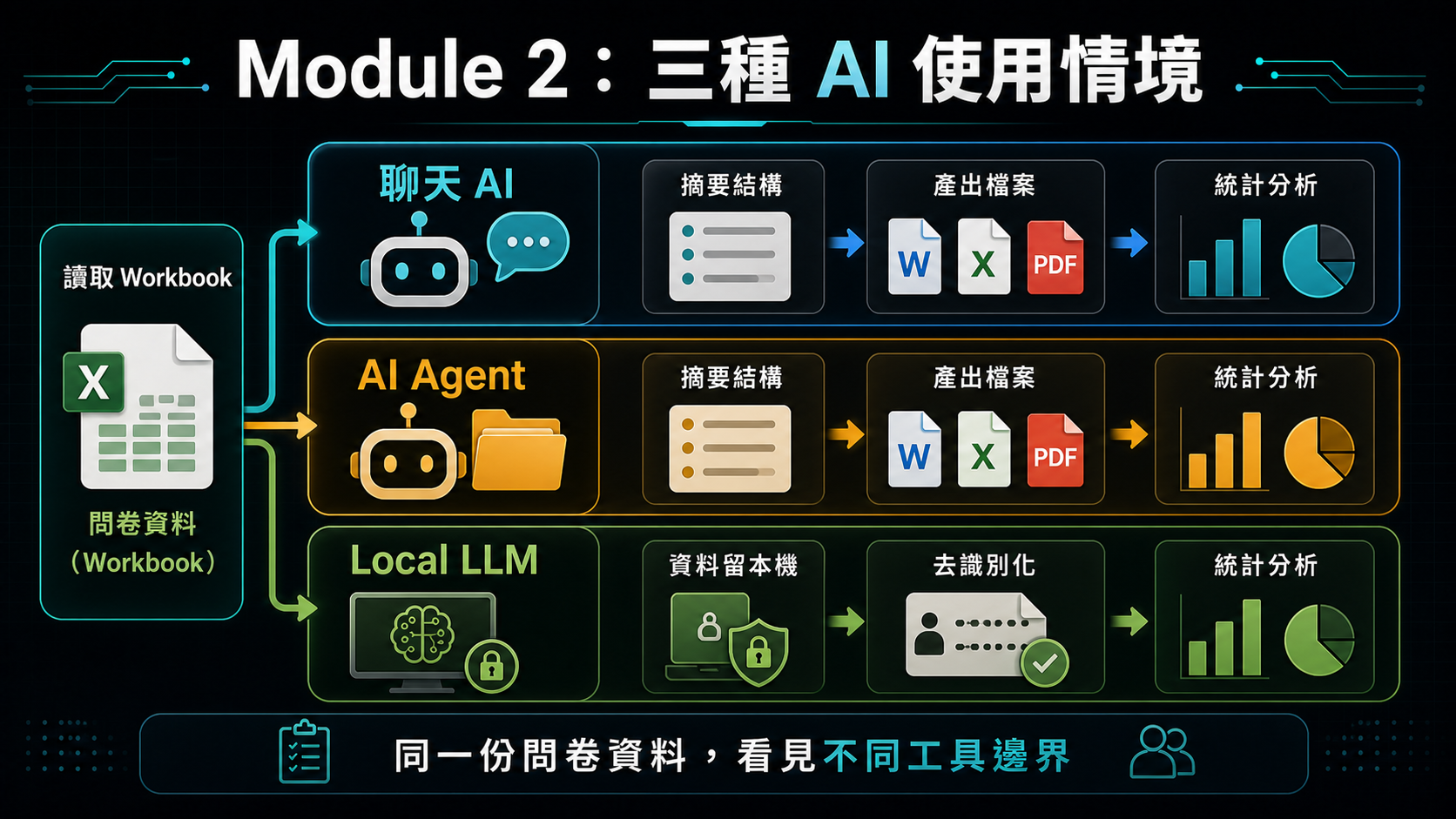
Module 2 三種 AI 使用情境資訊圖

十三、Module 2:用問卷資料比較三種 AI 使用情境

本節讓學員用同一份問卷資料比較三種 AI 使用情境。近期的雲端聊天 AI,例如 ChatGPT 或 Claude,已經可以直接讀取完整 .xlsx,不需要使用者把問卷資料切段或只貼幾列樣本。它適合快速理解 workbook 結構、摘要欄位、提出分析計畫與產生初步解讀;但分析結果通常仍停留在對話或附件中,後續若要形成可重複、可檢查的專案輸出,仍需要整理保存與驗證。

AI Agent,例如 Codex 或 Claude Code,適合進入專案資料夾,直接讀取 pre-test.xlsx 與 post-test.xlsx,解析問卷資料、檢查欄位與缺漏、計算信度與基本效度線索,並對前後測共同填答者進行 paired t-test。重點不只是得到統計數字,而是讓學員看見 Agent 可以把結果自動寫成 Markdown、CSV 或 HTML 檔,並把清理資料、分析步驟與驗證紀錄留在專案中。

Local LLM 則用來討論資料留在本機的價值。雖然一般筆電的本機運算能力很難和雲端 AI 服務相比,模型速度、能力與上下文長度也可能受限,但它的優點是資料不必離開本機,適合用來示範隱私保護、離線草稿、敏感資料先行摘要、或在上傳雲端前做去識別化處理。重點不是宣稱 Local LLM 比雲端更強,而是讓學員理解「資料留在本機」本身就是一種重要能力。

配套的 learning-by-doing 練習材料請見:Codex 問卷 Workbook 分析實作指南。這份材料帶學員直接用 Codex 分析問卷 workbook,從資料結構判讀、去識別化結果表,到前測信效度 HTML 報告,作為本節觀念比較的實作延伸。

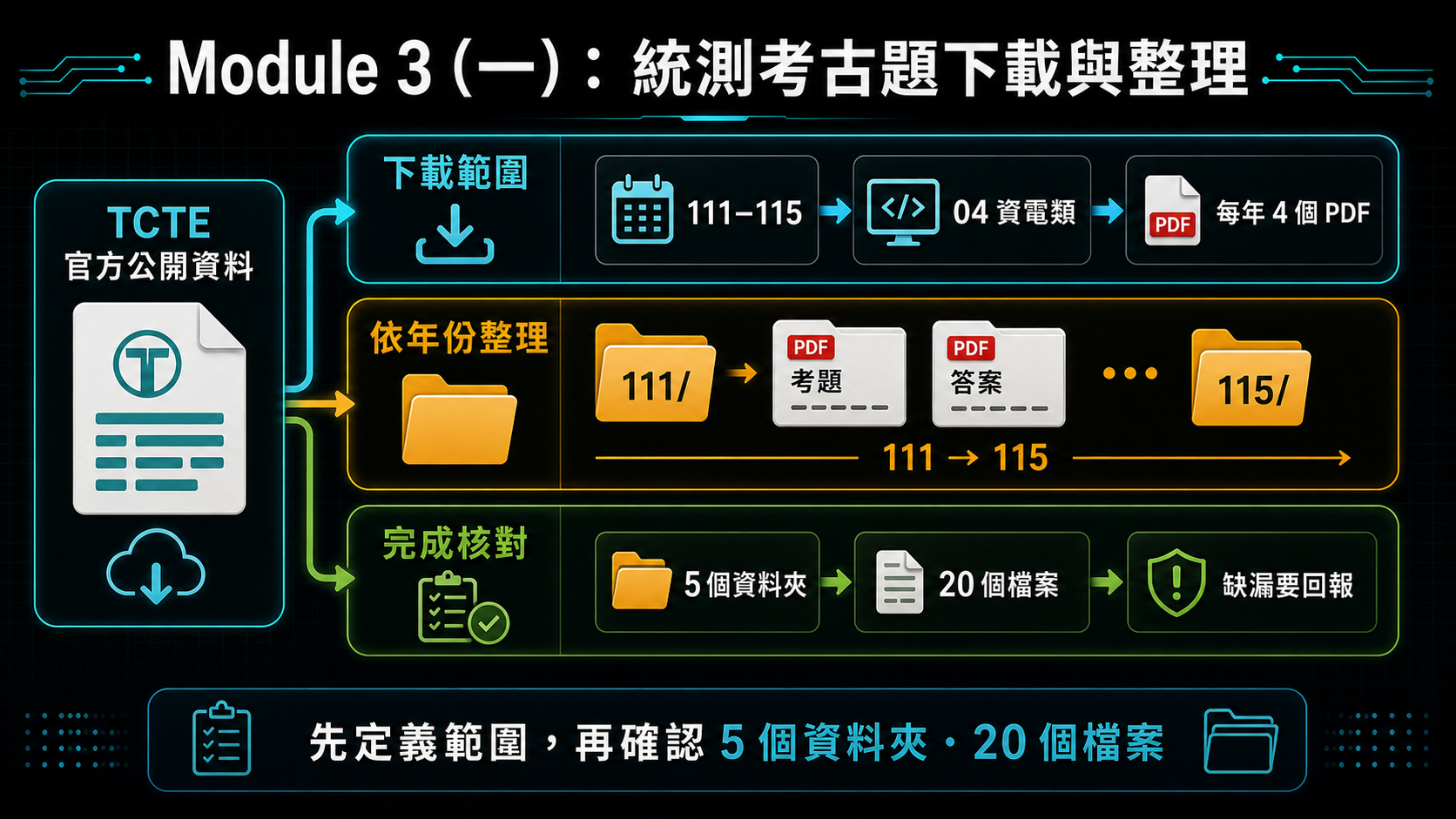
Module 3(一)統測考古題下載與整理資訊圖

十四、Module 3(一):下載統測歷年考題與答案

本節讓學員練習一個真實、公開、免登入的資料下載任務:從技專校院入學測驗中心(tcte.edu.tw)下載歷年四技二專統一入學測驗(統測)的試題與標準答案。這個任務使用真實官方網站,但範圍單純、不需登入、不需繞過任何限制,適合初學者練習「AI Agent 協助尋找資料來源、確認檔案格式、下載檔案並驗證內容」的完整流程。

操作重點:先請 AI Agent(ChatGPT Work 或 Codex)開啟技專校院入學測驗中心官網,找到四技二專歷年試題頁面,選擇一個學年度;再從該年度頁面選擇一個科目群(例如電機類),分別找到試題與標準答案的下載連結;下載後存到指定資料夾,並確認檔名清楚、檔案可正常開啟。

這個任務也是很好的教學案例:官方網站的試題與答案通常是分開列出的兩個檔案,練習時要特別留意「試題」與「答案」是否配對正確、是否為同一學年度與科目、格式是 PDF 還是 Word。若使用 Codex,可以請它把下載結果整理成一份小型清單(科目、學年度、試題檔名、答案檔名、下載狀態),作為後續驗證的紀錄。

官方來源:技專校院入學測驗中心 - 四技二專試題下載

配套的 learning-by-doing 練習材料請見:Codex 統測試題下載與 Markdown 題庫實作指南。這份材料帶學員用 Codex 下載「04電機與電子群資電類」109~115 學年度的試題與標準答案,並把 Word 試題轉換成統一格式的 Markdown 題庫。

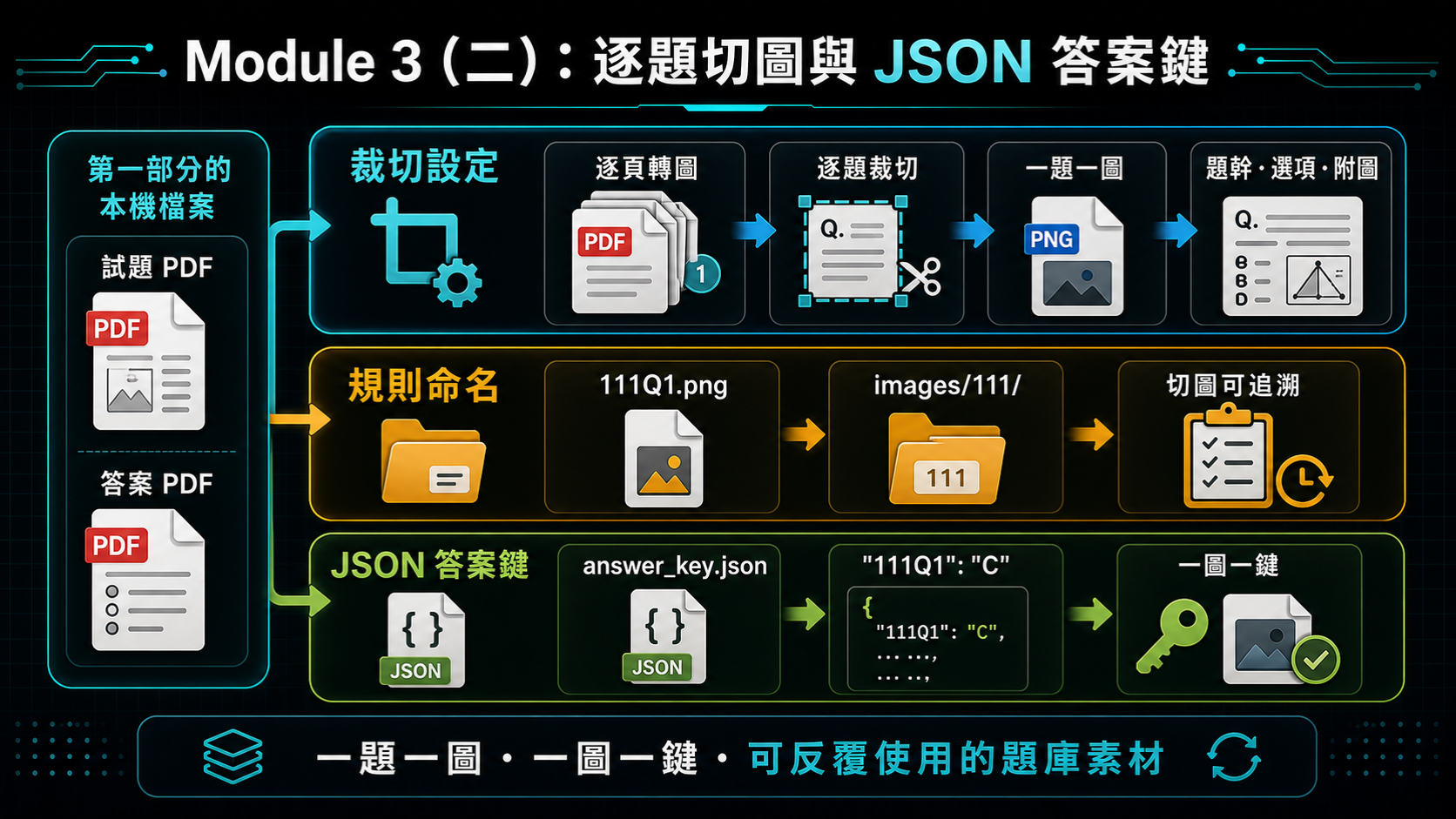
Module 3(二)逐題切圖與 JSON 答案鍵資訊圖

十五、Module 3(二):試題切題與 JSON 答案鍵

本節接續 Module 3(一)下載好的試題與標準答案 PDF,練習另一種資料整理任務:請 AI Agent 把試題 PDF 逐題裁切成一張一張的圖片,並對照標準答案建立一份 JSON 格式的答案鍵。跟「照著網址、連結點下去」不同,這次 Codex 得自己判斷每一題在頁面上從哪裡開始、到哪裡結束,是一個更依賴模型判斷力而非固定流程的任務。

操作重點:請 AI Agent(建議使用 Codex)把試題 PDF 轉成高解析度圖片,逐頁找出每一題的起始與結束位置(題幹、選項與附圖都算在內,直到下一題題號出現為止),再依指定的檔名規則(例如 <學年度>Q<題號>.png)裁切並命名;最後對照標準答案 PDF,用相同的檔名規則當作 key,整理成一份 answer_key.json。

這個任務也是很好的教學案例:跟 Module 3(一)「照著固定網址下載」不同,切題需要模型判斷版面配置、跨頁題目與雙欄排版等變化,適合用來比較精確版、詳細版與簡易版 Prompt 的差異——當任務需要「用眼睛判斷」而非「照著固定路徑走」時,把細節寫死是否還可靠。

配套的 learning-by-doing 練習材料請見:Codex 統測試題切題與答案鍵練習。這份材料延續第一部分下載好的「電機與電子群資電類・專業科目(一)」111~115 學年度試題,帶學員把 PDF 裁切成一題一張圖片,並建立對應的 JSON 答案鍵。

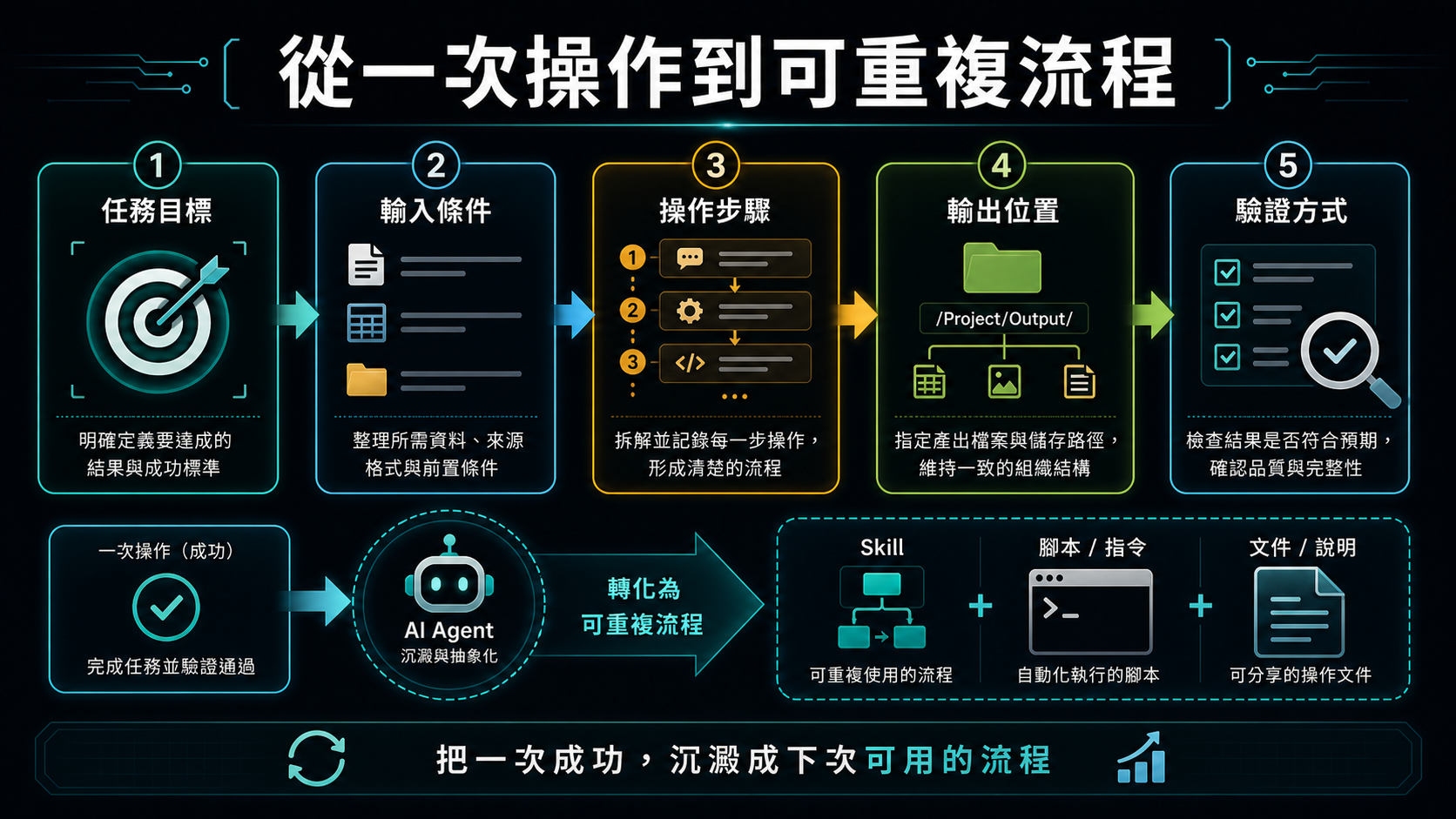
從一次操作到可重複流程資訊圖

十五、從一次操作到可重複流程

一次成功的操作只是開始。真正有價值的是把成功操作整理成未來可以重複執行的流程。若某項任務每週、每月或每學期都會做,就不應每次重新與 AI 對話,而應把流程固定成 Skill、腳本或清楚的操作文件。

可重複流程至少需要描述任務目標、輸入條件、操作步驟、輸出位置與驗證方式。以下載 CSV 為例,流程應包含如何確認本機伺服器可連線、開啟哪個 URL、支援哪些課程代碼、下載後存到哪個資料夾,以及如何確認檔案內容正確。

這種整理工作能把 AI Agent 從「現場聊天工具」轉變成「可累積的工作系統」。教師每次完成一個流程,都可以把經驗沉澱到專案中,讓下一次任務更快、更穩定,也更容易交給同事或學生使用。

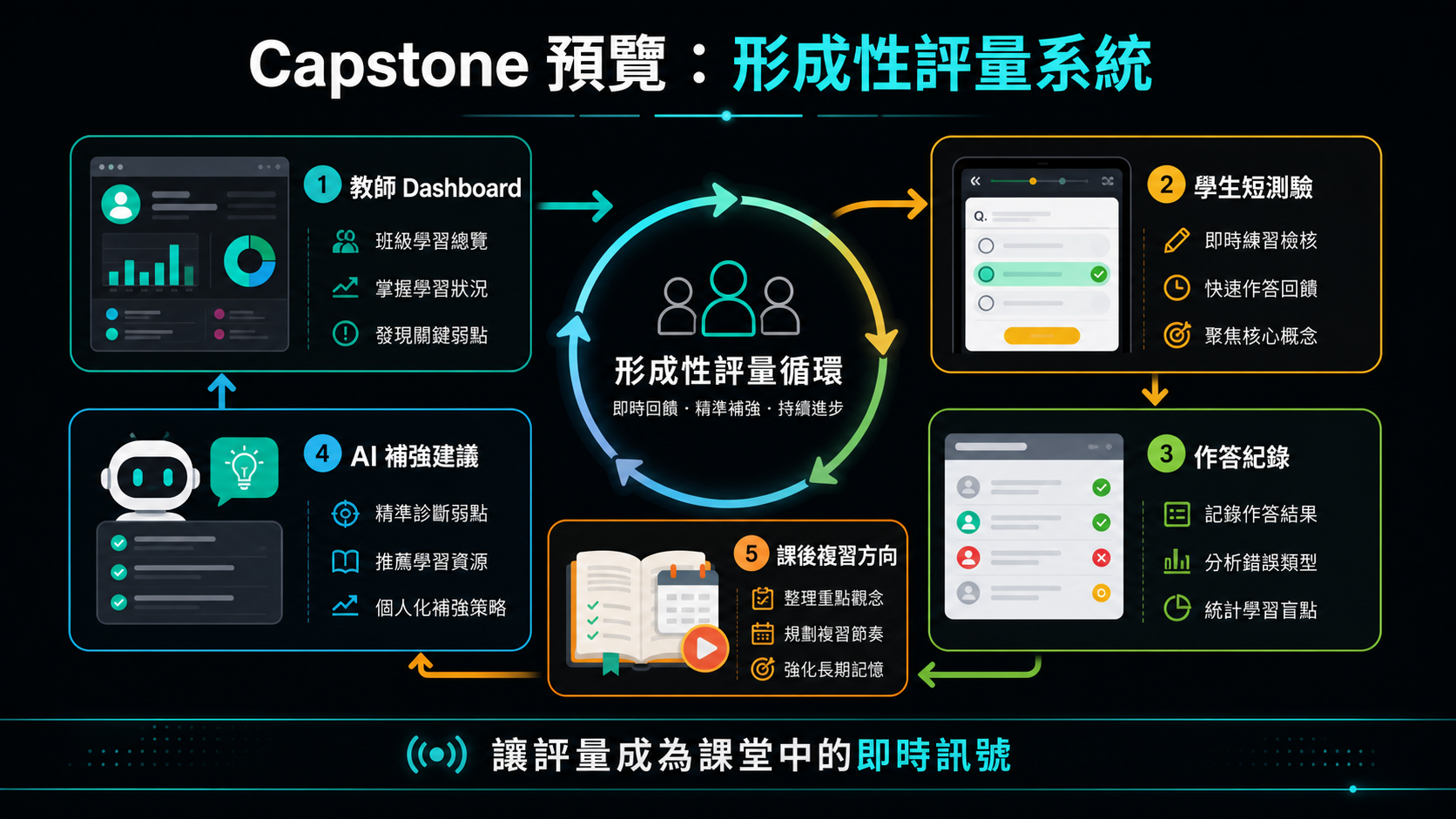
Capstone 形成性評量系統資訊圖

十六、Capstone 預覽:形成性評量系統與 AI 輔助教學

本系列工作坊最後會以 AI 形成性評量系統作為 Capstone 應用。這個範例不是單純做一份線上測驗,而是呈現一個完整的教學工具想像:教師端可以掌握全班作答狀態,學生端可以完成短測驗並帶走作答回顧,AI 則協助把錯題與教材轉成後續補強方向。

形成性評量的核心不是考倒學生,而是在課堂中快速回答三個問題:學生是否理解剛剛的概念、哪些學生或哪些題型需要教師再補充、學生作答後能不能取得下一步複習方向。若評量資料只停留在分數,教師能做的判斷有限;若能把作答進度、正確率、錯題紀錄與教材內容串起來,評量就會變成課堂中的即時訊號,也會成為學生課後補強的材料。

範例系統包含教師端 Dashboard 與學生端測驗介面。教師端看的是全班狀態,例如目前學生正在做哪一份測驗、完成幾題、正確率如何、是否已提交;學生端則提供登入、逐題作答、提交、成績摘要與逐題作答回顧。這些畫面讓學員先看見 Workshop 1、2、3 逐步累積後可能完成的教學應用,而不是要求一開始就理解所有技術細節。

AI 在這個設計中的位置是學習鷹架,而不是代答工具。學生完成作答後,可以把作答紀錄、題目內容與教材摘要提供給 ChatGPT、Gemini 或其他工具,請 AI 分析錯誤可能來自哪個概念、該回頭複習哪一段教材,以及下一步可以做什麼練習。這樣的流程讓 AI 協助診斷與補強,而最後的理解、判斷與修正仍然需要學生自己完成。

延伸參考:AI Agent 教學應用工作坊 Capstone 預覽:形成性評量系統設計意圖。

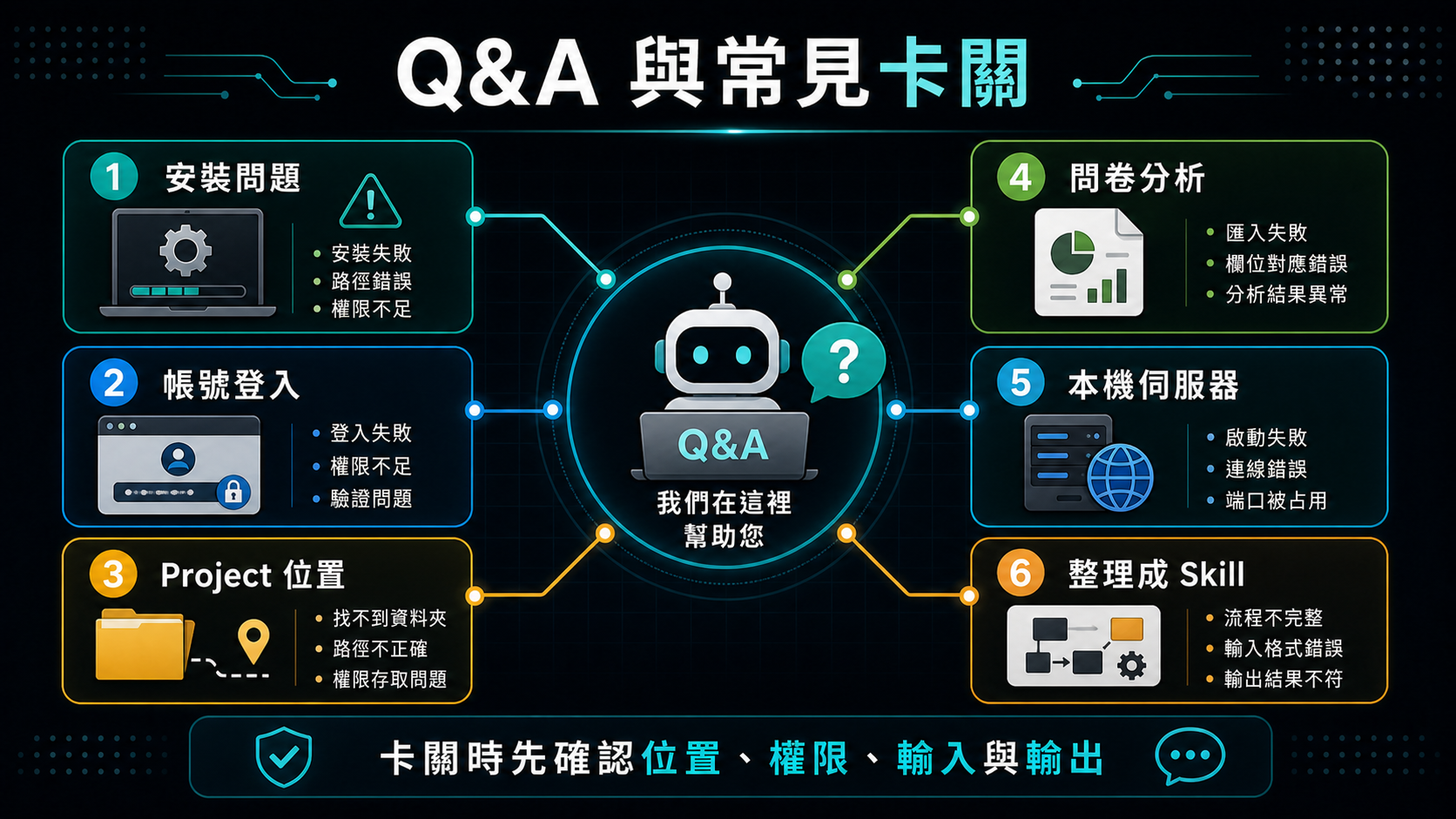
Q&A 與常見卡關資訊圖

十七、Q&A 與常見卡關整理

  • 工作坊主軸:環境準備、project 操作、資料分析、網頁擷取、可重複流程。
  • 安裝問題:權限、winget、App Installer、PATH、網路下載速度。
  • 帳號問題:ChatGPT / Codex 登入、GitHub 登入、額度與教育方案。
  • Project 問題:開錯資料夾、找不到教材、輸出位置不明。
  • 問卷分析問題:欄位解讀、前後測配對、去識別化、結果驗證。
  • 統測考題下載問題:找不到年度或科目頁面、試題與答案是否配對正確、檔案格式是 PDF 還是 Word、下載位置與檔名是否清楚。
  • 試題切題與答案鍵問題:裁切範圍是否包含完整題幹與選項、圖片張數是否等於題數、JSON 答案鍵的 key 是否與圖片檔名一一對應。
  • 可重複流程問題:何時整理成文件、腳本或 Skill。
0803 後測

AI Agent Teaching Applications Workshop (1)

Course Information

Dates and time:

Session Date Time
Session 1 July 2, 2026 (Thu.) 13:00 - 17:30
Session 2 July 9, 2026 (Thu.) 13:00 - 17:30

Agenda:

Time Content Speaker
12:30 - 13:00Check-in
13:00 - 13:10OpeningProvost Chao-Tang Yu
13:10 - 14:00AI Agent work environment setupProf. Rong-Lin Yang
14:00 - 14:50Introduction to AI toolsProf. Rong-Lin Yang
14:50 - 15:20Tea break
15:20 - 16:40Hands-on AI tool practiceProf. Rong-Lin Yang
16:40 - 17:30Demo, sharing, and discussionProf. Rong-Lin Yang
17:30 ~Dismissal
August 3 pre-test

AI Agent Teaching Applications Workshop (1)

The core goal of this workshop is to help teachers understand how AI Agents can become practical partners for teaching and administrative work. An AI Agent is not only a chat tool that answers questions; within an authorized workspace, it can read project files, edit content, run commands, operate a browser, and turn completed work into repeatable workflows.

Teachers do not need to become programmers before they can use these tools. The more important skills are describing goals clearly in natural language, providing the right materials, judging whether the output is correct, and gradually turning successful work into handouts, Skills, scripts, or workflows.

The course focuses on formative assessment, personalized feedback, data organization, web extraction, teaching-material generation, local project management, and safe AI Agent use. After the course, participants should be able to decide which tasks fit chat-based AI, which tasks fit AI Agents, and which data should remain local or be de-identified first.

Workshop goals and use cases infographic

1. Workshop Goals and Use Cases

By the end of the workshop, each teacher should leave with a small tool or repeatable workflow related to their own work. The outcome does not need to be a complete system or a large codebase. It may be a process for organizing student data, extracting web content, generating teaching pages, building interactive practice, or packaging a recurring administrative task as a reusable Skill.

Every teacher’s context is different. Different courses, schools, student groups, and administrative needs create different pain points. The purpose of the course is not to provide one standard answer, but to help participants understand the capability boundaries of AI Agents. If a task can normally be done with keyboard, mouse, browser, files, and simple tools, there is a chance an AI Agent can help plan, execute, and document it.

The workshop uses Codex as the core tool, alongside VS Code, GitHub, GitHub Copilot, Playwright MCP, and Ollama. The point is not to memorize tool names, but to understand how they can be combined into a workable process.

Natural language and vibe coding infographic

3. Natural Language, Vibe Coding, and the Changing Role of Code

The way people interact with computers is changing. In the past, interaction mainly depended on keyboards, mice, command lines, and graphical interfaces. Now natural language is also becoming an interface for operating computers.

Vibe coding is not only about coding. Its core is explaining clearly what you want. The user provides goals, materials, constraints, and feedback; AI helps generate programs, pages, teaching materials, automation flows, or data-processing results.

This does not mean programming knowledge no longer matters. When an outcome will be published, handle sensitive data, connect to external systems, or require long-term maintenance, safety, correctness, and maintainability still need to be checked.

Decision guide for the Chat, ChatGPT Work, and Codex surfaces

4. ChatGPT: Chat, Work, and Codex

Think of ChatGPT as the entry point, then choose the surface that matches the task. Chat is for quick questions, explanations, and short drafts. ChatGPT Work is for a multi-step deliverable that may use files or approved tools. Codex is for work that needs a codebase, local project files, commands, or developer tools.

These surfaces are complementary, not a claim that ChatGPT only produces text and Codex alone creates files. ChatGPT Work can also use files and approved tools. This workshop uses Codex for exercises that require a local workspace, repeatable scripts, and verifiable outputs.

Whenever a task can access files, tools, or external services, confirm its workspace boundary, permissions, and required approvals before continuing.

Data privacy and Local LLM infographic

5. Data Privacy, Cloud AI, and Local LLMs

Teachers often handle student data, grades, administrative data, and internal school documents. These materials should not be uploaded directly to cloud AI services without proper handling.

Before processing sensitive data, de-identify it first. Replace names, student IDs, class information, seat numbers, and other identifiers with codes, and keep only the fields needed for analysis.

A Local LLM runs on the user’s own computer, for example through Ollama. Its advantage is that data can stay local; its disadvantage is that it requires more hardware resources and may be slower or less capable than large cloud models.

Tokens permissions and safety awareness infographic

6. Tokens, Permissions, and Security Awareness

Tokens can be understood as the units AI systems use to process text and context. Longer conversations, more files, and more complex tasks consume more tokens. If an AI Agent repeatedly works in the wrong direction, it may quickly spend the available budget.

Permission management is central to AI Agent use. Users should avoid granting full computer access at the beginning. A safer approach is to limit work to a specific project or workspace so the Agent can read and modify only that folder.

Beginners should not leave an Agent running unattended for long periods. Teachers should watch what it plans to do, what it executes, whether it repeats failed attempts, whether it needs additional permissions, and whether the output matches expectations.

Computer environment and hardware requirements infographic

7. Computer Environment and Hardware Requirements

This course mainly uses cloud models, so model inference does not need to run on participants’ computers. A Windows laptop or Mac from the past three to five years is usually enough for the course exercises.

AI Agent work usually involves more than one chat window. Practice may involve Codex, a browser, a terminal, VS Code, a local server, and project folders at the same time. Sufficient memory matters more than a high-end GPU for this workshop.

Common classroom issues include network restrictions and slow downloads. If the ChatGPT desktop app, Codex CLI, packages, browser tools, or sample data download slowly, the cause may be school network policy or shared bandwidth rather than the tool itself.

Codex App setup infographic

8. Using Codex in ChatGPT

Open ChatGPT and sign in, then select Codex when the task needs a project folder, code, or developer tools. Available features depend on the account plan, workspace settings, and product rollout, so confirm the options visible after sign-in.

When setting up Codex for the first time, choose a clear project or workspace. Codex looks like a chat tool, but it is bound to a folder. This means it can read files, edit files, and use tools within the specified scope.

Basic settings should prioritize safety and understandability. For non-programmers, it is helpful to ask Codex to explain what it is doing in plain language. File access should initially be limited to the workspace.

Beginners should not enable full access at the start. A better path is to build trust with a small practice project and then gradually expand the task scope.

For details, see: ChatGPT (Codex) Workspace and Permission Settings.

Windows 11 vibe coding setup infographic

9. Windows 11 Vibe Coding Environment Preparation

This section focuses on Windows 11 laptops. The goal is to prepare a usable vibe-coding work environment, not to master every tool immediately.

The supplementary handout now offers three installation methods, chosen based on permissions, network access, and preference: manual installation, running winget commands one by one; installing via an AI Agent Prompt, by switching the ChatGPT desktop app to Work, turning on Full access, and pasting the course-provided prompt so the AI Agent checks for missing tools, installs them in order, and reports back (switch back to Ask for approval once the install finishes); or the course-provided setup-windows.bat one-click script. All three install the same toolset, so if one method fails, try another or fall back to fixing items manually. After setup, confirm that code, git, node, npm, uv, gh, and codex can show version numbers.

For accounts, confirm that ChatGPT / Codex and GitHub can both sign in. Codex CLI signs in through a browser, and GitHub CLI signs in with gh auth login and a one-time code.

Supplement: Windows 11 Vibe Coding and AI Agent Environment Setup

Markdown AGENTS.md and Skill infographic

10. Markdown, AGENTS.md, Skills, and Readable Documents

Markdown is an important document format in AI workflows. It is plain text, but it can organize headings, paragraphs, lists, tables, code blocks, and links. It is easy for people to read and structured enough for AI to use.

AGENTS.md can describe project rules: how to start the project, where files belong, how tests run, what output format is expected, and what data should not be changed.

A Skill is a way to preserve a repeatable process. When a task will happen again, such as organizing a roster, generating a fixed handout format, extracting a specific site, or creating similar reports, the workflow can be written as a Skill.

Practice reference: Introductory AGENTS.md Guide: Simple Project Rules for Codex.

Plugin Playwright MCP and Computer Use infographic

11. Plugins, Playwright MCP, and Computer Use

In Codex, Plugins and Skills are different layers. A Plugin is like a capability or integration package. After installation, it may provide new tools, apps, MCP servers, browser control, desktop operation, or other system capabilities.

A Skill is more like a task guide or repeatable workflow. It does not necessarily add new low-level tools; instead, it tells Codex how to handle a specific type of task, what materials to read, which tools to use, and how to verify the result.

In short, Plugins provide what Codex can use; Skills provide how Codex should work on a task.

Playwright MCP provides structured browser control: opening pages, clicking buttons, filling forms, waiting for JavaScript rendering, taking screenshots, and extracting data.

Computer Use is a more general GUI operation capability. It is powerful but harder to govern, so structured tools such as APIs, CLIs, or MCP should be preferred whenever possible.

Record and Replay workflow infographic

12. Record & Replay: From Demonstration to Intent-Based Replay

Record & Replay means recording a user’s operation once, then letting an AI Agent repeat the same intent later. It does not simply memorize mouse coordinates; it tries to understand the task goal, important fields, inputs, outputs, decision points, and completion criteria.

Record extracts the workflow from a demonstration. Replay uses that workflow to complete the task again when the user provides a new date, file, or query condition.

This is different from a traditional macro. Macros often remember fixed clicks and keystrokes; if the screen changes, they may fail. Record & Replay is closer to turning a demonstration into task knowledge.

It is also different from traditional web scraping. Web scraping targets HTML, API responses, or DOM structures; Record & Replay is better for workflows people normally perform through a GUI.

Use this only for clear, repeatable, low-risk tasks with human supervision. Do not use it to bypass website restrictions, CAPTCHAs, paywalls, or terms of service.

Three AI use contexts infographic

13. Comparing Three AI Use Scenarios with Questionnaire Data

This section uses the same questionnaire data to compare three AI use scenarios. Recent cloud chat AI tools such as ChatGPT or Claude can read a full .xlsx workbook directly, without requiring users to paste only a few rows or split the workbook into small pieces.

AI Agents such as Codex or Claude Code are suitable for entering a project folder, reading pre-test.xlsx and post-test.xlsx, parsing questionnaire data, checking fields and missing values, calculating reliability and validity clues, and running paired t-tests for matched pre/post respondents.

Local LLMs are used to discuss the value of keeping data on the local machine. Their speed, ability, and context length may be limited, but the privacy benefit is important.

Hands-on guide: Codex Questionnaire Workbook Analysis Practice Guide.

Module 3 Part 1 infographic for downloading and organizing historical exam papers and answer keys

14. Module 3 (Part 1): Download Historical Exam Papers and Answer Keys

This section uses a real, public, no-login data download task: downloading past Four-Year Technology and Two-Year Program Joint College Entrance Examination (統測) exam papers and standard answer keys from the official Technical and Vocational Education Joint College Entrance Examination Center (tcte.edu.tw). The scope stays simple — no login and nothing to bypass — making it a good beginner exercise for AI Agent-assisted source discovery, format confirmation, file download, and verification.

Workflow: ask the AI Agent (ChatGPT Work or Codex) to open the official site, find the historical exam paper page for the Four-Year Technology and Two-Year Program track, choose an academic year, then choose a subject group (for example, Electrical/Electronics) and locate the download links for the exam paper and the standard answer key. Save the downloads to a named folder and confirm the filenames are clear and the files open correctly.

This is also a good teaching moment: the exam paper and the answer key are usually listed as two separate files. Learners should check that the paper and the answer key match the same year and subject group, and note whether the format is PDF or Word. When using Codex, ask it to summarize the downloads into a small checklist (subject, year, exam file name, answer file name, download status) as a verification record.

Official source: Technical and Vocational Education Joint College Entrance Examination Center — Four-Year Technology exam downloads

Hands-on guide: Codex Exam Archive Download and Markdown Question Bank Practice Guide. This guide walks learners through using Codex to download the 109–115 exam papers and answer keys for the "04 Electrical and Electronics Group — Information/Electronics Track," then convert the Word exam files into a uniformly structured Markdown question bank.

Module 3 Part 2 infographic for cropping questions and building a JSON answer key

15. Module 3 (Part 2): Question Cropping and JSON Answer Key

This section continues from the exam papers and answer keys downloaded in Module 3 (Part 1) and practices a different kind of data-organizing task: asking the AI Agent to crop the exam PDF into one image per question and build a JSON-format answer key by cross-referencing the standard answer PDF. Unlike "follow the URL and click," this time Codex has to judge for itself where each question starts and ends on the page — a task that depends more on the model's judgment than a fixed procedure.

Workflow: ask the AI Agent (Codex is recommended) to convert the exam PDF into high-resolution images, scan each page to locate where every question starts and ends (including the stem, all options, and any accompanying figures or tables, up to the next question number), crop and name each image using the specified filename rule (e.g., <year>Q<number>.png), then cross-reference the standard answer PDF using the same filenames as keys to assemble an answer_key.json.

This is also a good teaching case: unlike Module 3 (Part 1)'s "download from a fixed URL," cropping requires the model to judge page layout, questions spanning two pages, and two-column formats — a good opportunity to compare precise, detailed, and simple prompt styles, and to ask whether hardcoding details still holds up when a task requires "judging by eye" rather than "following a fixed path."

Hands-on guide: Codex Exam Question Cropping and Answer Key Practice Guide. This guide continues from the "04 Electrical and Electronics Group — Information/Electronics Track, Specialized Subject (1)" exam papers for academic years 111–115 downloaded in Part 1, walking learners through cropping the PDF into one image per question and building the corresponding JSON answer key.

From one-time operation to repeatable workflow infographic

15. From One-Time Operation to Repeatable Workflow

A successful one-time operation is only the beginning. The real value is turning that success into a process that can be run again in the future.

A repeatable workflow should describe the task goal, input conditions, steps, output location, and verification method. For example, a CSV download workflow should explain how to confirm the server is reachable, which URL to open, which course codes are supported, where to save the file, and how to verify the result.

This turns an AI Agent from an on-the-spot chat helper into an accumulative work system. Each completed workflow can become part of the project and make the next task faster and more stable.

Capstone formative assessment infographic

16. Capstone Preview: Formative Assessment and AI-Assisted Teaching

The workshop series will end with an AI formative-assessment system as the capstone application. This example is not just an online quiz. It presents a complete teaching-tool scenario: the teacher side tracks class progress, the student side completes short quizzes and reviews responses, and AI helps turn wrong answers and teaching materials into follow-up learning directions.

The point of formative assessment is not to make tests harder. It is to answer three classroom questions quickly: whether students understood the concept, which students or question types need more support, and what students should review next after answering.

The example system includes a teacher dashboard and a student quiz interface. The teacher sees class-level status such as quiz progress, completion, accuracy, and submission state. The student side supports login, question-by-question answering, submission, score summary, and response review.

AI is used as learning scaffolding, not as an answer machine. After students submit their work, their responses, question content, and material summary can be given to ChatGPT, Gemini, or another tool to analyze possible misconceptions, recommend review sections, and suggest next exercises.

Reference: AI Agent Teaching Applications Workshop Capstone Preview: Design Intent for a Formative Assessment System.

Q&A and common blockers infographic

17. Q&A and Common Troubleshooting

  • Workshop focus: environment setup, project operation, data analysis, web extraction, and repeatable workflows.
  • Installation issues: permissions, winget, App Installer, PATH, and network download speed.
  • Account issues: ChatGPT / Codex login, GitHub login, quota, and education plans.
  • Project issues: wrong folder, missing materials, and unclear output location.
  • Questionnaire analysis issues: field interpretation, pre/post pairing, de-identification, and result verification.
  • Exam download issues: finding the right year or subject page, matching the exam paper to its answer key, PDF vs. Word format, and clear download locations and filenames.
  • Question cropping and answer key issues: whether each crop captures the full stem and options, whether the image count matches the question count, and whether the JSON answer key's keys line up one-to-one with the image filenames.
  • Repeatable workflow issues: when to turn work into a document, script, or Skill.
August 3 post-test